CrowdDrop HilfeCrowdDrop Help

Alles was du über die App wissen musst — Schritt für Schritt erklärt, mit Screenshots.Everything you need to know about the app — explained step by step, with screenshots.

🚀
Erste SchritteFirst Steps
Setup in unter 2 MinutenSetup in under 2 minutes
📲Installation & LoginInstallation & Login
CrowdDrop ist eine native macOS-App. Nach dem Download aus dem Mac App Store kannst du dich mit deiner Apple ID oder per E-Mail-OTP (6-stelliger Code) anmelden.CrowdDrop is a native macOS app. After downloading from the Mac App Store, sign in with your Apple ID or via email OTP (6-digit code).
1
App herunterladenDownload the appMac App Store → CrowdDrop DJ Console → LadenMac App Store → CrowdDrop DJ Console → Get
2
AnmeldenSign inMit Apple ID oder E-Mail-Adresse (einmaliger Code)With Apple ID or email address (one-time code)
3
Event erstellenCreate eventDJ-Name, Event-Name und PIN vergebenEnter DJ name, event name and PIN
4
QR-Code teilenShare QR codeAuf Bildschirm anzeigen, drucken oder kopierenDisplay on screen, print, or copy
💡Das erste Event ist kostenlos. Es können bis zu 50 Gäste gleichzeitig teilnehmen.The first event is free. Up to 50 guests can participate simultaneously.
🧭
Onboarding GuideOnboarding Guide
Geführte Einführung beim ersten StartGuided introduction on first launch
🎬Automatischer Start & Demo-DatenAutomatic Start & Demo Data
Beim ersten Start bietet CrowdDrop an, anonymisierte Demo-Daten zu laden. Die App zeigt damit sofort, wie sie im echten Einsatz aussieht — mit einem fertigen Event, Musikwünschen, Nachrichten und Statistiken. Du kannst alle Bereiche frei erkunden und Änderungen vornehmen.On first launch, CrowdDrop offers to load anonymized demo data. The app then immediately shows what it looks like in real use — with a ready-made event, song requests, messages and statistics. You can freely explore all areas and make changes.
💡Demo-Daten leben in einem separaten Bereich und vermischen sich nie mit deinen echten Daten. Du kannst sie jederzeit in den Einstellungen löschen.Demo data lives in a separate area and never mixes with your real data. You can delete it at any time in Settings.
🪟Das schwebende Guide-PanelThe Floating Guide Panel
Der Guide erscheint als kleines, schwebendes Panel — es sperrt die App nicht. Du kannst weiterhin alle Bereiche anklicken, Einstellungen ändern und die Demo-Daten in Ruhe anschauen. Das Panel navigiert die Sidebar automatisch zum jeweils erklärten Bereich, du kannst aber jederzeit selbst woanders hinwechseln.The guide appears as a small floating panel — it does not block the app. You can still click all areas, change settings and explore the demo data at your own pace. The panel automatically navigates the sidebar to the area being explained, but you can switch to any other area at any time.
1
Panel ist frei verschiebbar — einfach per Drag & Drop an die gewünschte Position ziehenPanel is freely movable — just drag it to the desired position
2
Weiter → geht zum nächsten Bereich und navigiert die Sidebar automatischNext → moves to the next area and navigates the sidebar automatically
3
Überspringen lässt einen Schritt aus, ohne den Rest zu beeinflussenSkip skips a step without affecting the rest
4
Guide beenden bricht den Guide komplett ab — er startet nicht mehr automatischExit Guide stops the guide completely — it will not restart automatically
🔁Guide neu starten & Demo-Daten verwaltenRestart Guide & Manage Demo Data
Unter Einstellungen → Hilfe & Support kannst du den Guide jederzeit neu starten. Dort findest du auch die Option, Demo-Daten zu löschen oder neu zu laden.Under Settings → Help & Support you can restart the guide at any time. You'll also find the option to delete or reload demo data there.
🧭
Guide neu startenRestart Guide

Startet alle 14 Schritte von vorne — nützlich nach dem ersten KennenlernenRestarts all 14 steps from the beginning — useful after the first introduction

🗑️
Demo-Daten löschenDelete Demo Data

Entfernt alle Demo-Inhalte dauerhaft. Deine echten Daten bleiben unberührtRemoves all demo content permanently. Your real data remains untouched

💾
Fortschritt wird gespeichertProgress is saved

Schließt du die App während des Guides, geht es beim nächsten Start genau dort weiterIf you close the app during the guide, it resumes exactly where you left off next time

📊
Demo-Daten behaltenKeep Demo Data

Nach Abschluss des Guides kannst du die Demo-Daten zum Weiterstöbern behaltenAfter completing the guide you can keep the demo data to continue exploring
📋Die 14 Guide-Schritte im ÜberblickThe 14 Guide Steps at a Glance
Der Guide führt dich der Reihe nach durch alle wichtigen Bereiche der App:The guide takes you through all important areas of the app in order:
1
DashboardNow Playing, Vote-Only Status, offene WünscheNow Playing, Vote-Only status, open requests
2
NachrichtenMessagesGästenachrichten, Vorlagen, BroadcastsGuest messages, templates, broadcasts
3
Musik-BibliothekMusic LibraryBibliotheken verwalten und freigebenManage and share libraries
4
PlaylistenPlaylistsPlaylisten, Abgleich mit DJ-SoftwarePlaylists, sync with DJ software
5
ImportMusik aus Rekordbox, Serato, Spotify & Co. importierenImport music from Rekordbox, Serato, Spotify & more
6
ProfileProfilesDJ-Profil mit Bild, Bio und Trinkgeld-LinksDJ profile with photo, bio and tipping links
7
EventsEvent erstellen, konfigurieren, online schaltenCreate, configure and publish an event
8
MediaQR-Codes, Print Editor, Social Media CreatorQR codes, print editor, social media creator
9
StatistikenStatisticsGäste, Anfragen, CSV-ExportGuests, requests, CSV export
10
Web ConsoleBrowser-Zugang für Windows & andere PlattformenBrowser access for Windows & other platforms
11
OverlayStream-Overlay für OBS & StreamlabsStream overlay for OBS & Streamlabs
12
GewinnspieleContests5 Gewinnspiel-Typen mit QR-Verifizierung5 contest types with QR verification
13
WerbungAdsBanner und Interstitials in der Gäste-AppBanners and interstitials in the guest app
14
EinstellungenSettingsDJ-Software, Benachrichtigungen, SpracheDJ software, notifications, language
🎪
Events verwaltenManage Events
Mehrere Events, ein KontoMultiple events, one account
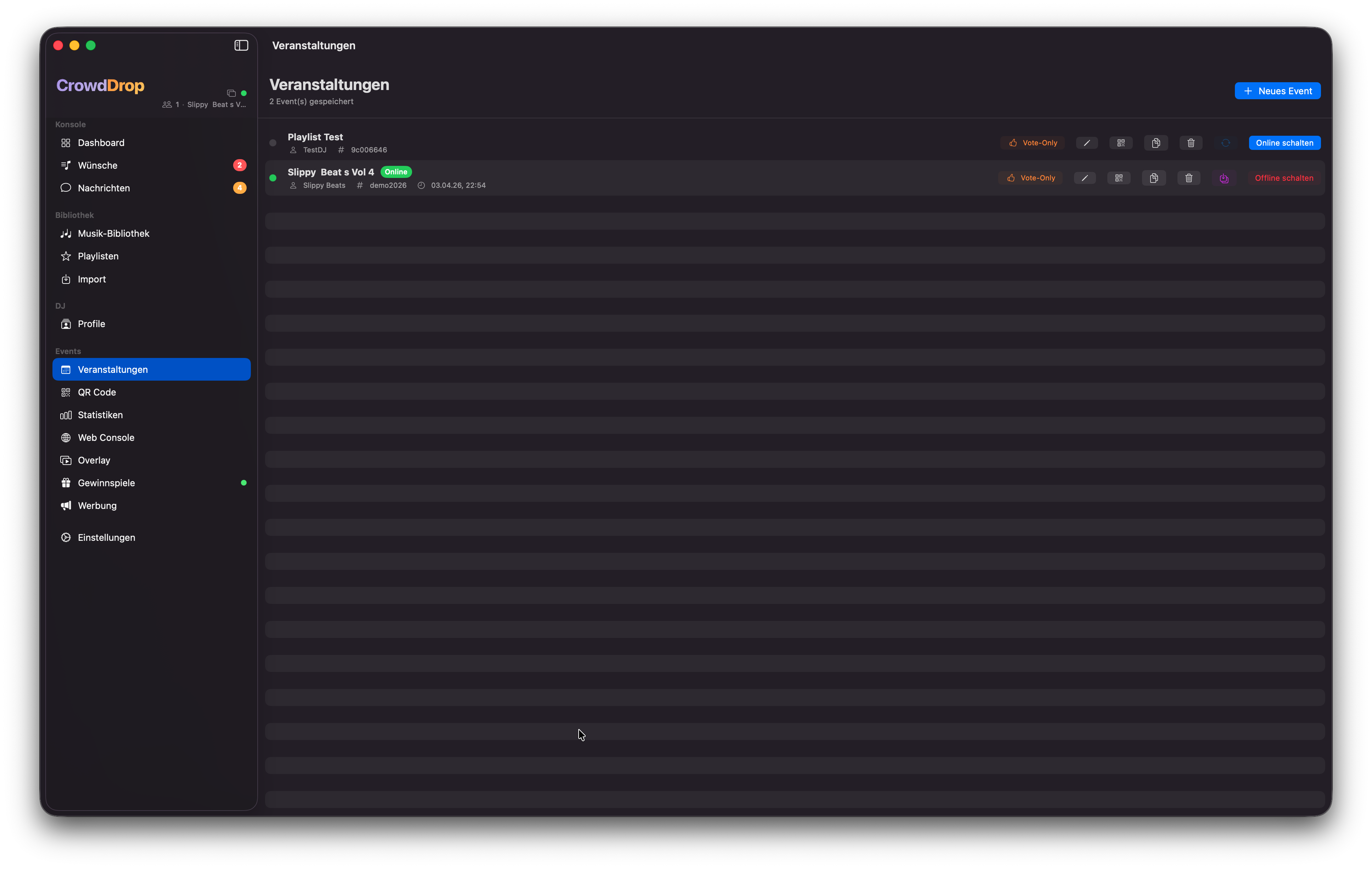
Events
Event-Übersicht mit Status, QR-Code und Verwaltungs-OptionenEvent overview with status, QR code and management options
Mehrere EventsMultiple Events
Du kannst beliebig viele Events anlegen und zwischen ihnen wechseln. Jedes Event hat eine eigene Event-ID, URL und PIN.You can create as many events as you like and switch between them. Each event has its own event ID, URL and PIN.
  • Online schaltenGo onlineMacht dieses Event zum aktiven Event. Gäste können sich dann über die Event-URL einloggen.Makes this event the active one. Guests can then connect via the event URL.
  • KopierenDuplicateErstellt eine Kopie eines Events inklusive aller Einstellungen (Branding, Limits) mit neuer ID und PIN.Creates a copy of an event including all settings (branding, limits) with a new ID and PIN.
  • Bestehendes Event verbindenConnect existing eventFalls du von einem anderen Gerät ein Event erstellt hast, kannst du es mit Event-ID und PIN verbinden.If you created an event on another device, connect it with event ID and PIN.
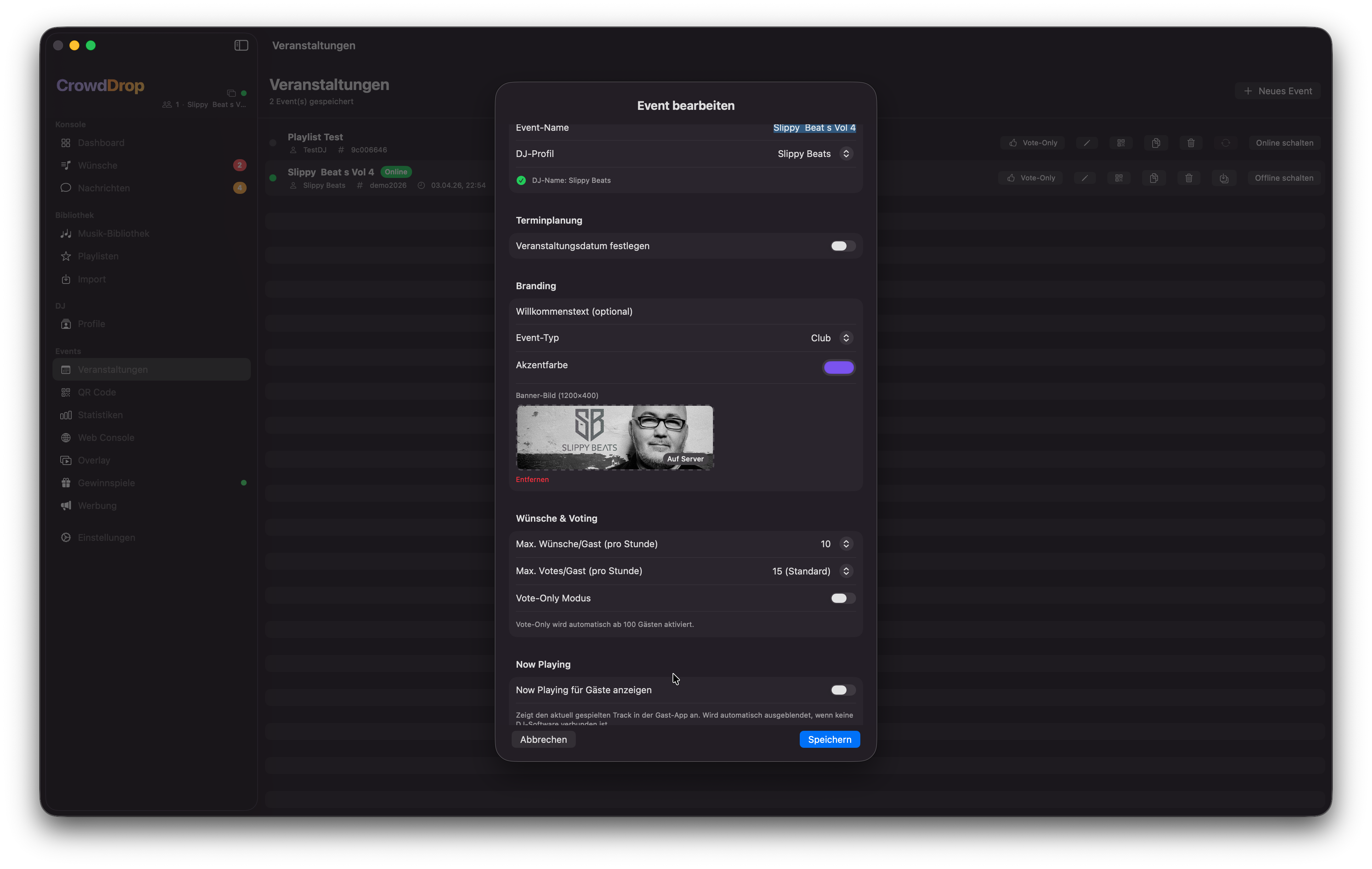
Event Detail
Event-Detail: Branding, Gästelimits, QR-Code und VerbindungsstatusEvent detail: branding, guest limits, QR code and connection status
📊
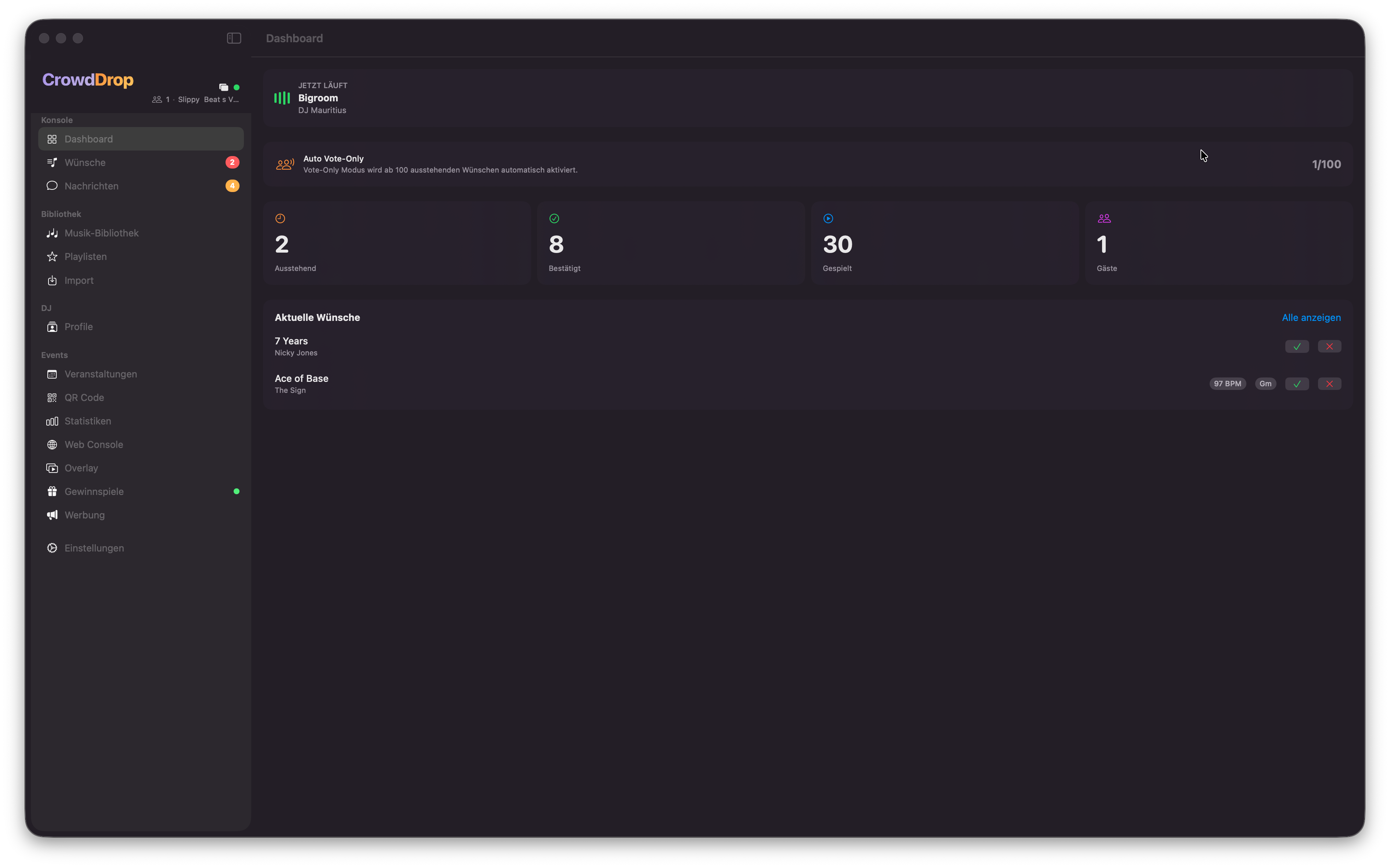
Dashboard
Dein Blick auf das Event in EchtzeitYour real-time view of the event
Dashboard
Dashboard: Now Playing, Live-Statistiken und aktuelle WünscheDashboard: now playing, live stats and current requests
Now Playing Bar
Zeigt den aktuell gespielten Song mit animierten EQ-Balken. Die Info kommt automatisch von Rekordbox, Serato oder VirtualDJ — sobald ein Track geladen wird, aktualisiert sich die Anzeige ohne manuellen Eingriff. Gäste sehen denselben Track in ihrer App.Shows the currently playing track with animated EQ bars. The info comes automatically from Rekordbox, Serato or VirtualDJ — when a track loads, the display updates without manual action. Guests see the same track in their app.
Live-StatistikenLive Stats
Vier Kennzahlen in Echtzeit über WebSocket aktualisiert:Four metrics updated in real time via WebSocket:

Pending

Offene Wünsche, die noch nicht bearbeitet wurden.Open requests that haven't been processed yet.

Confirmed

Bestätigte Wünsche, die noch nicht gespielt wurden.Confirmed requests not yet played.

Played

Bereits gespielte Tracks.Already played tracks.

Guests

Aktuell verbundene Gäste.Currently connected guests.
SchnellzugriffQuick Access
Die Top 5 offenen Wünsche (nach Votes sortiert) können direkt im Dashboard bestätigt oder abgelehnt werden — ohne in den Requests-Bereich wechseln zu müssen.The top 5 open requests (sorted by votes) can be confirmed or declined directly from the dashboard — no need to switch to the requests area.
🎵
MusikwünscheSong Requests
Volle Kontrolle über jeden WunschFull control over every request
Musikwünsche
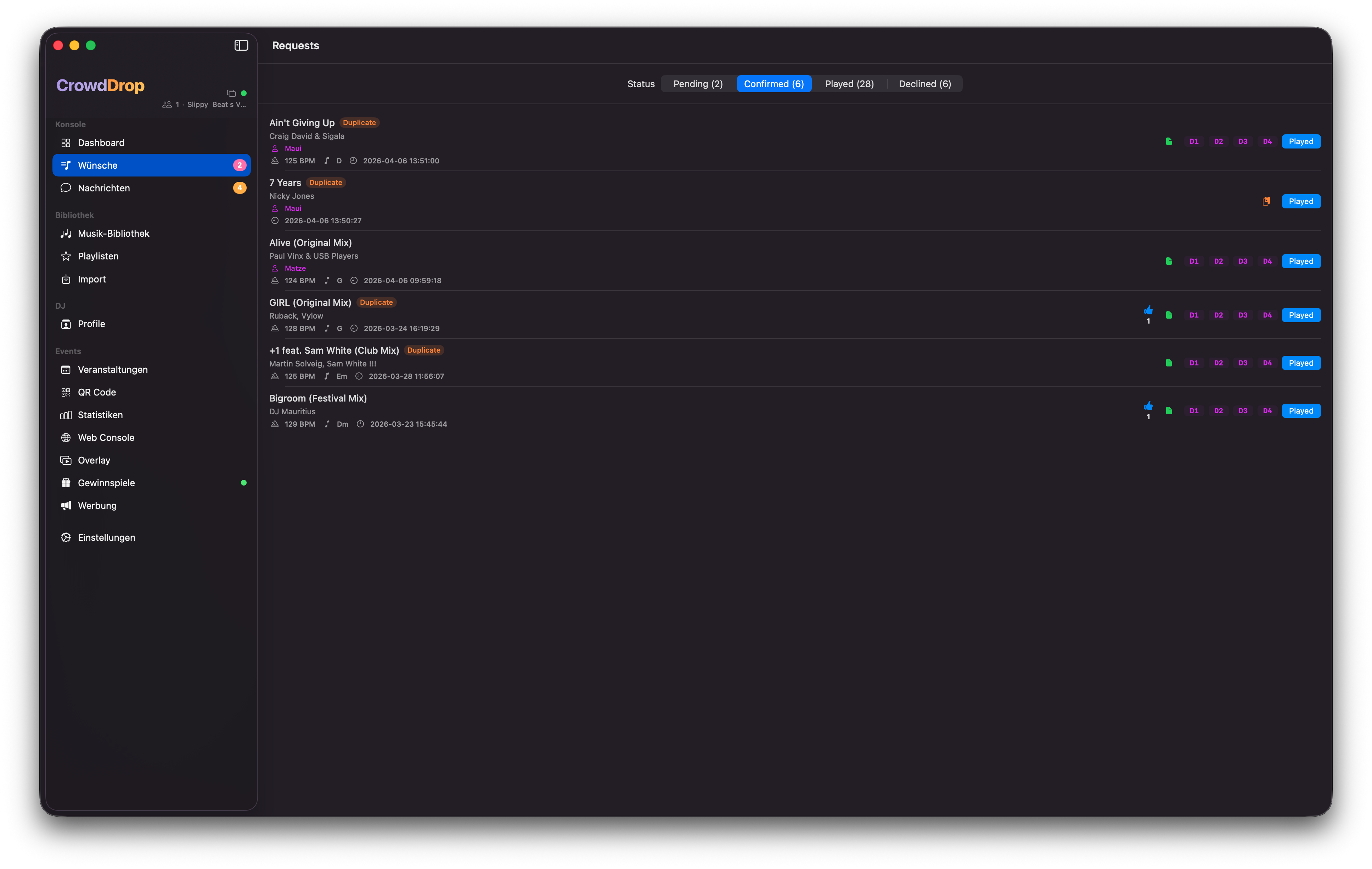
Wunschliste mit Voting, Duplikat-Erkennung, BPM und TonartRequest list with voting, duplicate detection, BPM and key
Status-TabsStatus Tabs
Alle Wünsche sind in vier Status-Bereiche aufgeteilt:All requests are split into four status areas:
  • PendingNeue, unbearbeitete Wünsche. Sortiert nach Votes (meiste zuerst).New, unprocessed requests. Sorted by votes (most first).
  • ConfirmedBestätigte Tracks — noch nicht gespielt, aber schon in der Warteschlange.Confirmed tracks — not yet played, but queued up.
  • PlayedBereits gespielte Tracks. Archiv aller gespielten Requests des Events.Already played tracks. Archive of all played requests for the event.
  • DeclinedAbgelehnte Wünsche. Der Gast sieht in seiner App, dass sein Wunsch abgelehnt wurde.Declined requests. The guest sees in their app that their request was declined.
Voting-SystemVoting System
Gäste können für Songs abstimmen. Je mehr Votes ein Song hat, desto weiter oben erscheint er in der Pending-Liste. Ab 10 Votes bekommt der Track automatisch ein 🔥 HOT-Badge. Du siehst immer, welche Songs gerade am meisten gewünscht werden.Guests can vote for songs. The more votes a song has, the higher it appears in the pending list. From 10 votes the track automatically gets a 🔥 HOT badge. You always see which songs are currently most requested.
Duplikat-ErkennungDuplicate Detection
Wenn ein Song mehrfach von verschiedenen Gästen gewünscht wird, erscheint ein oranges DUPLIKAT-Badge am Request. So weißt du sofort, welche Tracks besonders gefragt sind — ohne das Voting zählen zu müssen.When a song is requested multiple times by different guests, an orange DUPLICATE badge appears on the request. This lets you immediately see which tracks are especially popular — without counting votes.
BPM, Tonart & weitere DetailsKey & More Details
Jeder Wunsch zeigt BPM, Tonart (Camelot-Notation), Gastname und Wunschzeitpunkt. So kannst du direkt einschätzen, ob ein Track harmonisch passt, bevor du ihn bestätigst.Each request shows BPM, key (Camelot notation), guest name and request time. This lets you directly assess whether a track fits harmonically before confirming it.
Drag & Drop in DJ-Softwareinto DJ Software
Bestätigte Tracks können per Drag & Drop direkt aus der Wunschliste in Rekordbox, Serato oder VirtualDJ gezogen werden. CrowdDrop fügt den Track automatisch zur Event-Playlist in deiner DJ-Software hinzu.Confirmed tracks can be dragged directly from the wishlist into Rekordbox, Serato or VirtualDJ. CrowdDrop automatically adds the track to the event playlist in your DJ software.
ℹ️Für Rekordbox muss die App geschlossen sein, wenn CrowdDrop Tracks schreibt. Serato und VirtualDJ funktionieren im laufenden Betrieb.For Rekordbox the app must be closed when CrowdDrop writes tracks. Serato and VirtualDJ work while running.
💬
GästenachrichtenGuest Messages
Direkter Draht zu deinen GästenA direct line to your guests
Nachrichten
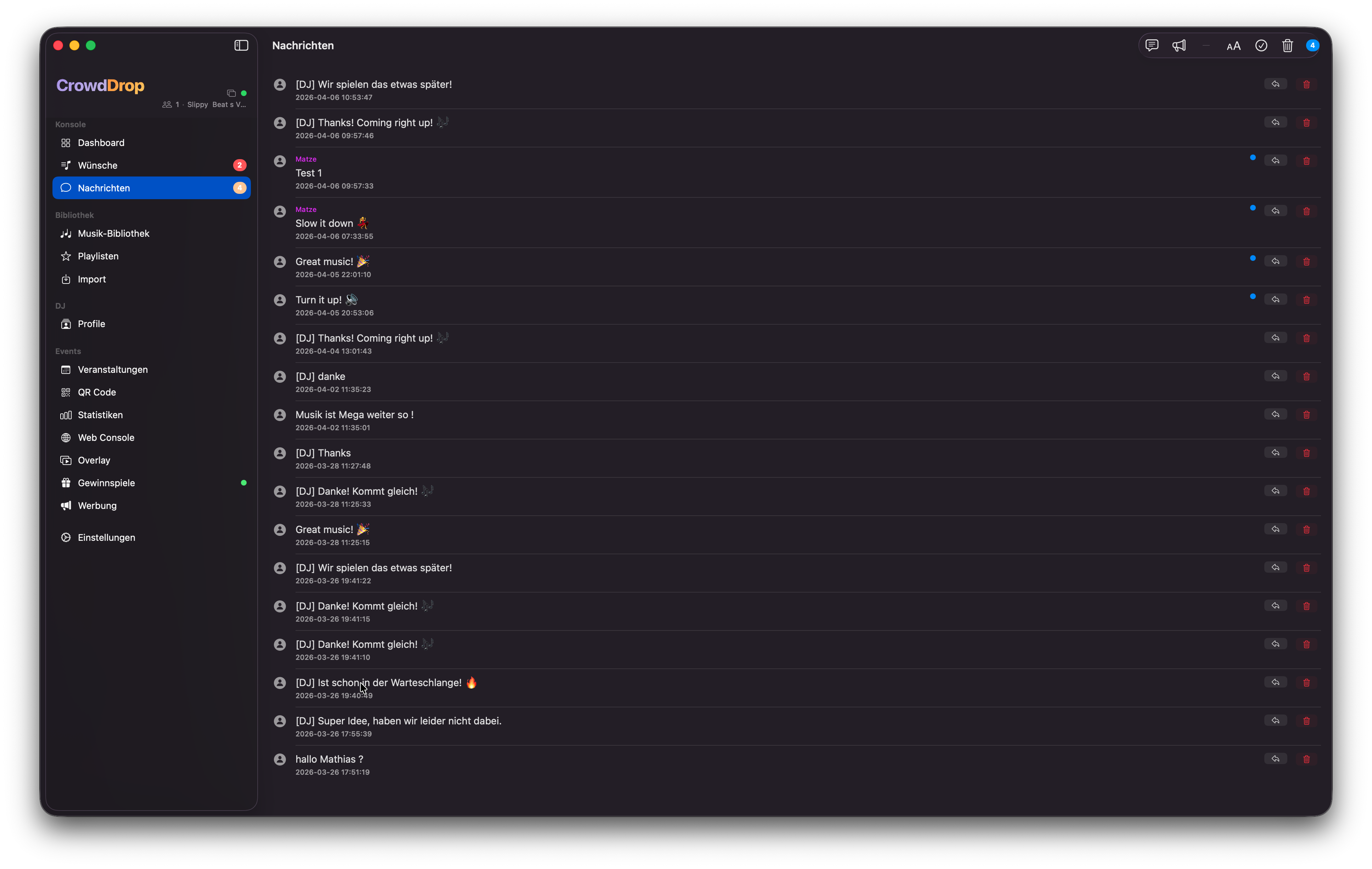
Nachrichtenverwaltung mit Quick-Reply, Multi-Select und BroadcastMessage management with quick reply, multi-select and broadcast
Nachrichten empfangen & beantwortenReceive & Reply to Messages
Gäste können dir direkte Nachrichten schicken — z. B. Geburtstagswünsche, Heiratsanträge, Shoutouts oder Fragen. Du siehst Name, Nachrichtentext und Zeitstempel. Antworten werden über die Session-ID direkt an den richtigen Gast zugestellt.Guests can send you direct messages — e.g. birthday wishes, marriage proposals, shoutouts or questions. You see name, message text and timestamp. Replies are delivered directly to the right guest via session ID.
  • SchnellantwortenQuick repliesVordefinierte Antwortvorlagen (von dir konfigurierbar) mit einem Klick senden.Pre-defined reply templates (configurable by you) sent with one click.
  • FreitextFree textEigene individuelle Antwort direkt im Textfeld eingeben.Enter your own individual reply directly in the text field.
  • Ungelesen-BadgeUnread badgeDer orangene Badge in der Sidebar zeigt die Anzahl ungelesener Nachrichten.The orange badge in the sidebar shows the number of unread messages.
Multi-Select & Bulk-LöschenMulti-Select & Bulk Delete
Über den Checkmark-Button in der Toolbar aktivierst du den Auswahlmodus. Nachrichten antippen zum Auswählen, dann alle auf einmal löschen. Ideal nach dem Event für schnelles Aufräumen.Activate selection mode via the checkmark button in the toolbar. Tap messages to select them, then delete all at once. Ideal for quick clean-up after the event.
Broadcast an alle GästeBroadcast to All Guests
Mit dem Megaphone-Icon kannst du eine Nachricht an alle verbundenen Gäste gleichzeitig senden. Ideal für Ansagen, Gewinnspiel-Hinweise oder Informationen zum Abend.With the megaphone icon you can send a message to all connected guests simultaneously. Ideal for announcements, contest hints or information about the evening.
💡Broadcast-Vorlagen kannst du im Template-Manager hinterlegen und mit einem Klick auswählen.You can save broadcast templates in the template manager and select them with one click.
🎼
MusikbibliothekMusic Library
Die Grundlage für MusikwünscheThe foundation for song requests
Musikbibliothek
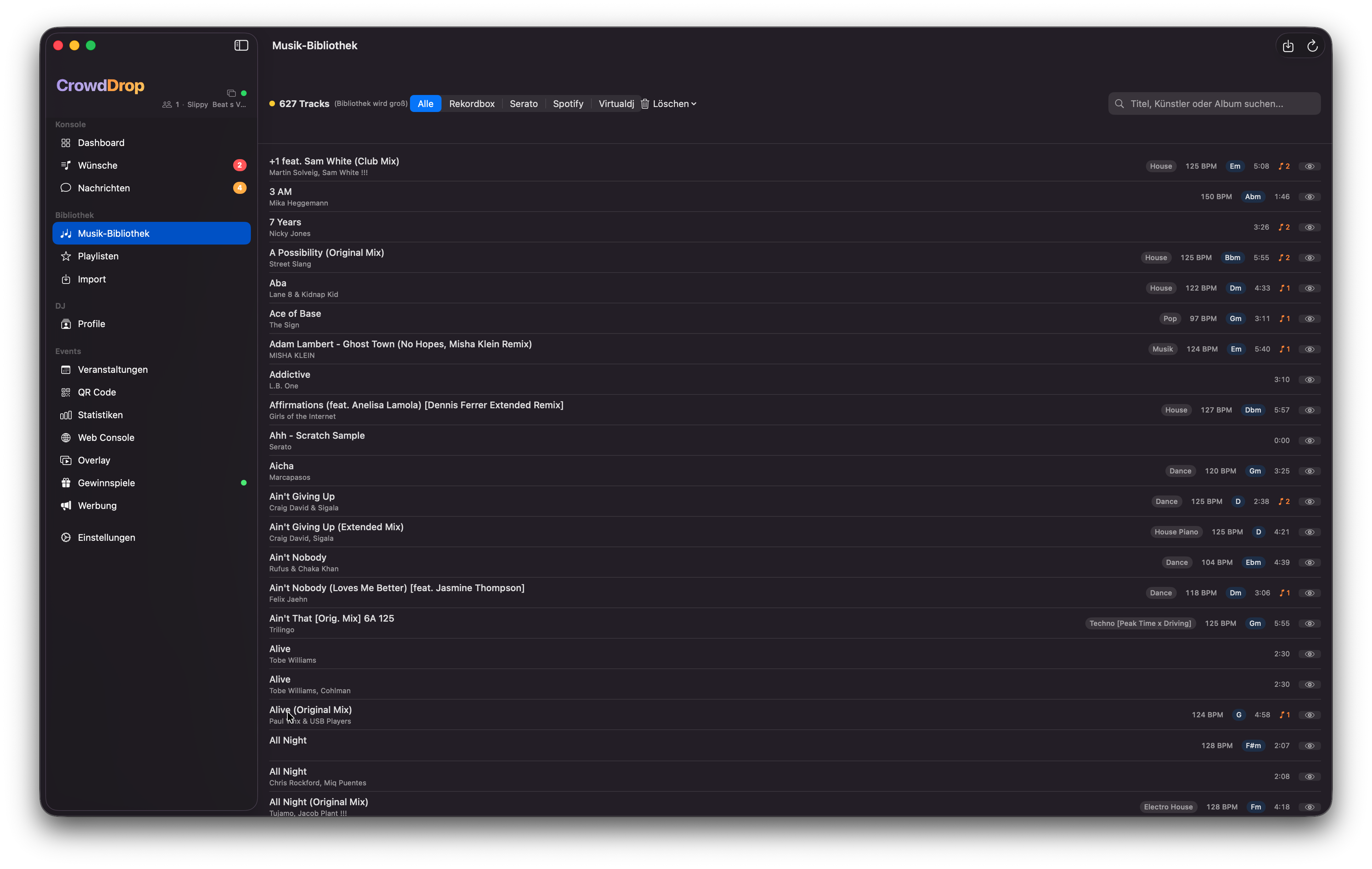
Musikbibliothek mit Suche, Track-Details und Sichtbarkeits-ToggleMusic library with search, track details and visibility toggle
Was ist die Bibliothek?What is the Library?
Die Musikbibliothek ist die Sammlung aller Tracks, aus denen deine Gäste Wünsche machen können. Gäste sehen die Bibliothek und suchen darin nach Songs. Maximal 1.000 Tracks pro Event.The music library is the collection of all tracks your guests can request. Guests see the library and search for songs in it. Maximum 1,000 tracks per event.
ℹ️Tracks in der Bibliothek enthalten BPM, Tonart, Genre und Dauer aus deiner DJ-Software — Gäste sehen diese aber nicht direkt, sie suchen nur nach Titel und Künstler.Tracks in the library contain BPM, key, genre and duration from your DJ software — guests don't see this directly, they only search by title and artist.
Tracks ausblendenHide Tracks
Mit dem Auge-Symbol neben jedem Track kannst du ihn für Gäste unsichtbar machen — er bleibt in der Bibliothek, taucht aber nicht mehr in der Suche auf. Ideal für Tracks, die du nicht spielen willst, aber in der Statistik behalten möchtest.With the eye icon next to each track you can make it invisible for guests — it stays in the library but no longer appears in search. Ideal for tracks you don't want to play but want to keep in statistics.
📥
Import
Alle DJ-Software-Quellen in einer BibliothekAll DJ software sources in one library
Import
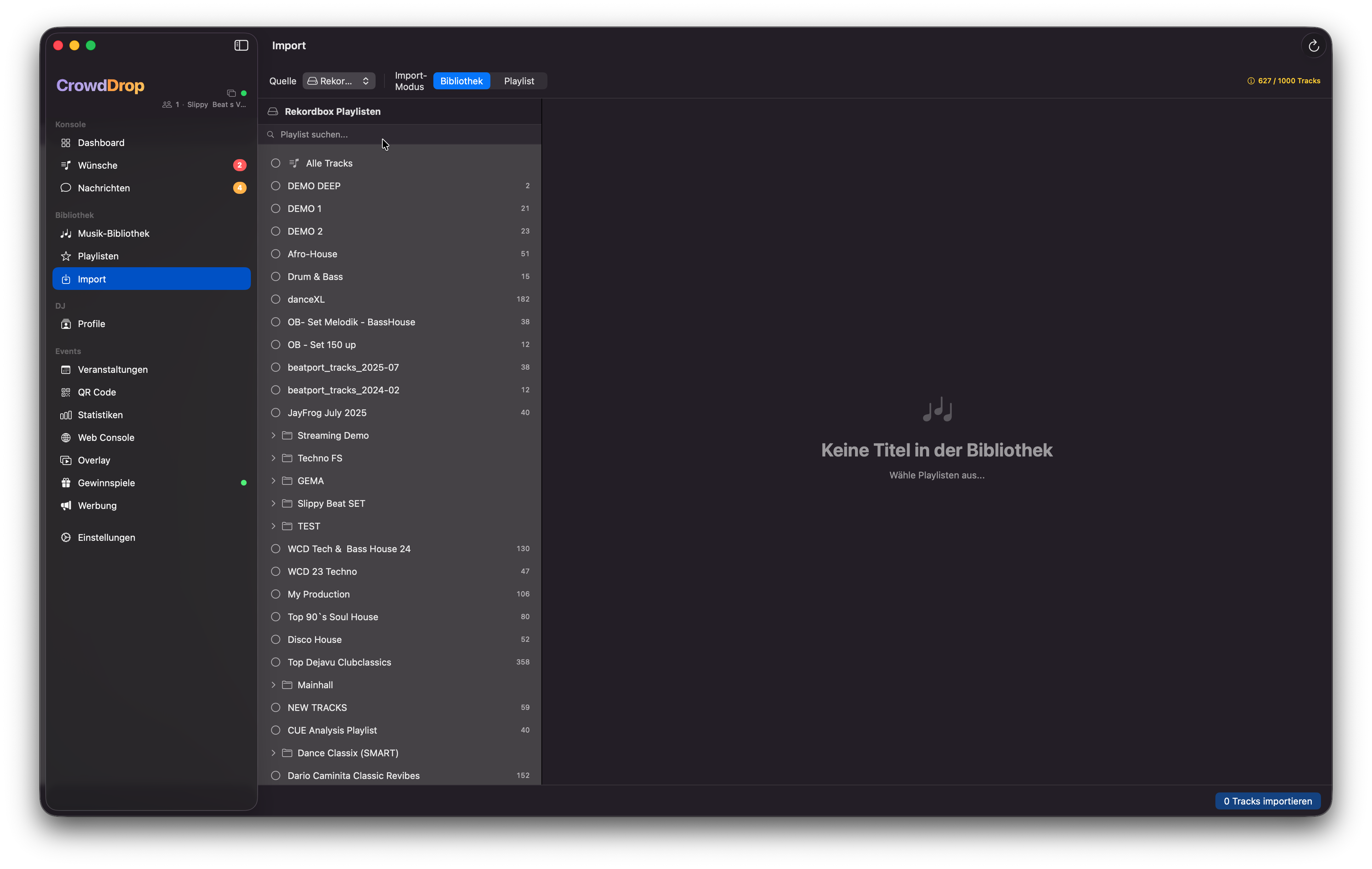
Import-Ansicht mit Playlist-Baum und Track-AuswahlImport view with playlist tree and track selection
Rekordbox
Direkter Zugriff auf die Rekordbox-Datenbank (master.db). CrowdDrop liest alle Playlisten und Tracks automatisch aus — inkl. BPM, Tonart, Genre und Dauer. Der Datenbankpfad wird auto-erkannt, kann aber manuell gesetzt werden.Direct access to the Rekordbox database (master.db). CrowdDrop reads all playlists and tracks automatically — including BPM, key, genre and duration. The database path is auto-detected but can be set manually.
⚠️Zum Exportieren von Tracks zurück in Rekordbox muss Rekordbox geschlossen sein. Beim Import aus Rekordbox kann die App laufen.To export tracks back into Rekordbox, Rekordbox must be closed. For importing from Rekordbox the app can be running.
Serato DJ
Liest Serato-Crates (`.crate`-Dateien) aus ~/Music/_Serato_/. Auch verschachtelte Ordner-Hierarchien werden korrekt dargestellt. Der Standardpfad wird auto-erkannt.Reads Serato crates (`.crate` files) from ~/Music/_Serato_/. Nested folder hierarchies are also correctly displayed. The default path is auto-detected.
VirtualDJ
Verbindet sich über das VirtualDJ Network Control Plugin (HTTP auf Port 8080). Playlisten werden als M3U-Dateien in ~/Documents/VirtualDJ/Playlists/CrowdDrop/ gespeichert. Keine manuelle Konfiguration nötig.Connects via the VirtualDJ Network Control Plugin (HTTP on port 8080). Playlists are saved as M3U files in ~/Documents/VirtualDJ/Playlists/CrowdDrop/. No manual configuration needed.
Spotify
Importiert Spotify-Playlisten über OAuth. Nach der einmaligen Authentifizierung kannst du Playlisten durchsuchen und Tracks importieren. CrowdDrop vergleicht Spotify-Tracks automatisch mit deiner lokalen DJ-Bibliothek (Fuzzy-Matching).Imports Spotify playlists via OAuth. After the one-time authentication you can browse playlists and import tracks. CrowdDrop automatically matches Spotify tracks against your local DJ library (fuzzy matching).
💡Beim Spotify-Import siehst du welche Tracks in deiner DJ-Bibliothek vorhanden sind (grüner Haken) und welche nicht. Nur gefundene Tracks werden importiert.During Spotify import you see which tracks exist in your DJ library (green tick) and which don't. Only found tracks are imported.
Apple Music
Greift über das iTunesLibrary-Framework auf deine Apple Music / Music.app Bibliothek zu. Playlisten werden angezeigt und Tracks per Matching mit der DJ-Bibliothek abgeglichen.Accesses your Apple Music / Music.app library via the iTunesLibrary framework. Playlists are displayed and tracks matched against the DJ library.
M3U / XML
Importiert Tracks aus M3U-Playlist-Dateien oder Rekordbox-XML-Exporten. Ideal wenn du Playlisten zwischen verschiedenen Systemen austauschen möchtest.Imports tracks from M3U playlist files or Rekordbox XML exports. Ideal when you want to exchange playlists between different systems.
📋
Playlisten & HotlistPlaylists & Hotlist
Deine kuratierte Vorauswahl für GästeYour curated pre-selection for guests
Playlisten
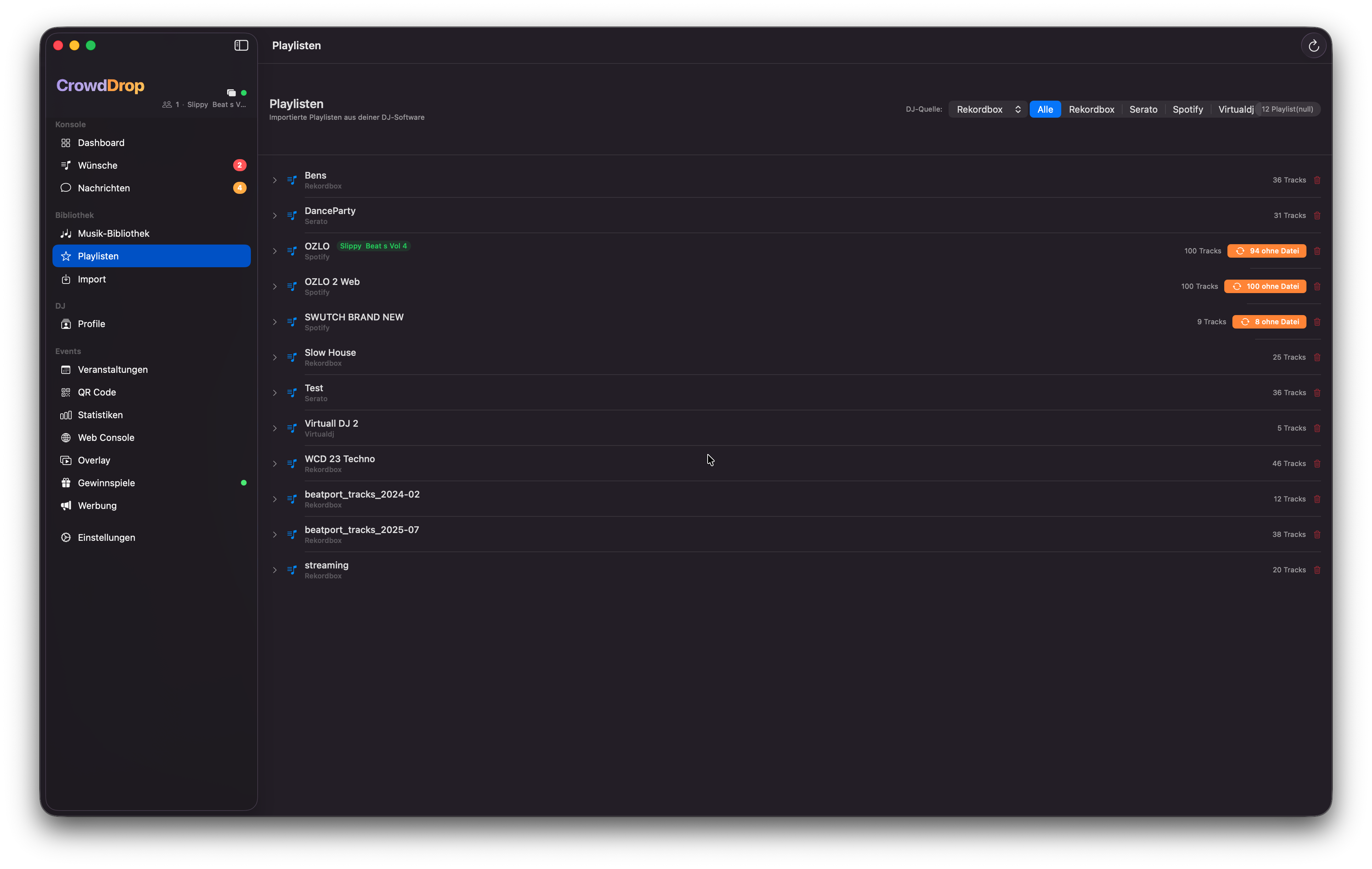
Playlist-Verwaltung mit Drag & Drop Reihenfolge und Hotlist-Limit-AnzeigePlaylist management with drag & drop ordering and hotlist limit display
Was ist die Hotlist?What is the Hotlist?
Die Hotlist (auch "DJ's Picks") ist eine handverlesene Liste von bis zu 50 Tracks, die du für das Event empfiehlst. Gäste sehen die Hotlist als eigenen Tab in ihrer App — gut für Hochzeiten, Firmenevents oder wenn du die Auswahl etwas steuern möchtest.The hotlist (also "DJ's Picks") is a hand-picked list of up to 50 tracks that you recommend for the event. Guests see the hotlist as their own tab in their app — great for weddings, corporate events or when you want to guide the selection.
  • Drag & DropDrag & DropReihenfolge der Hotlist per Ziehen anpassen.Adjust the order of the hotlist by dragging.
  • Tracks hinzufügenAdd tracksAus der gesamten Bibliothek suchen und zur Hotlist hinzufügen.Search the entire library and add tracks to the hotlist.
  • Limit-AnzeigeLimit displayFarbindikator zeigt die aktuelle Auslastung (grün / gelb / rot).Colour indicator shows current usage (green / yellow / red).
🎰
GewinnspieleContests
5 Typen, ein Knopfdruck, maximales Engagement5 types, one button, maximum engagement
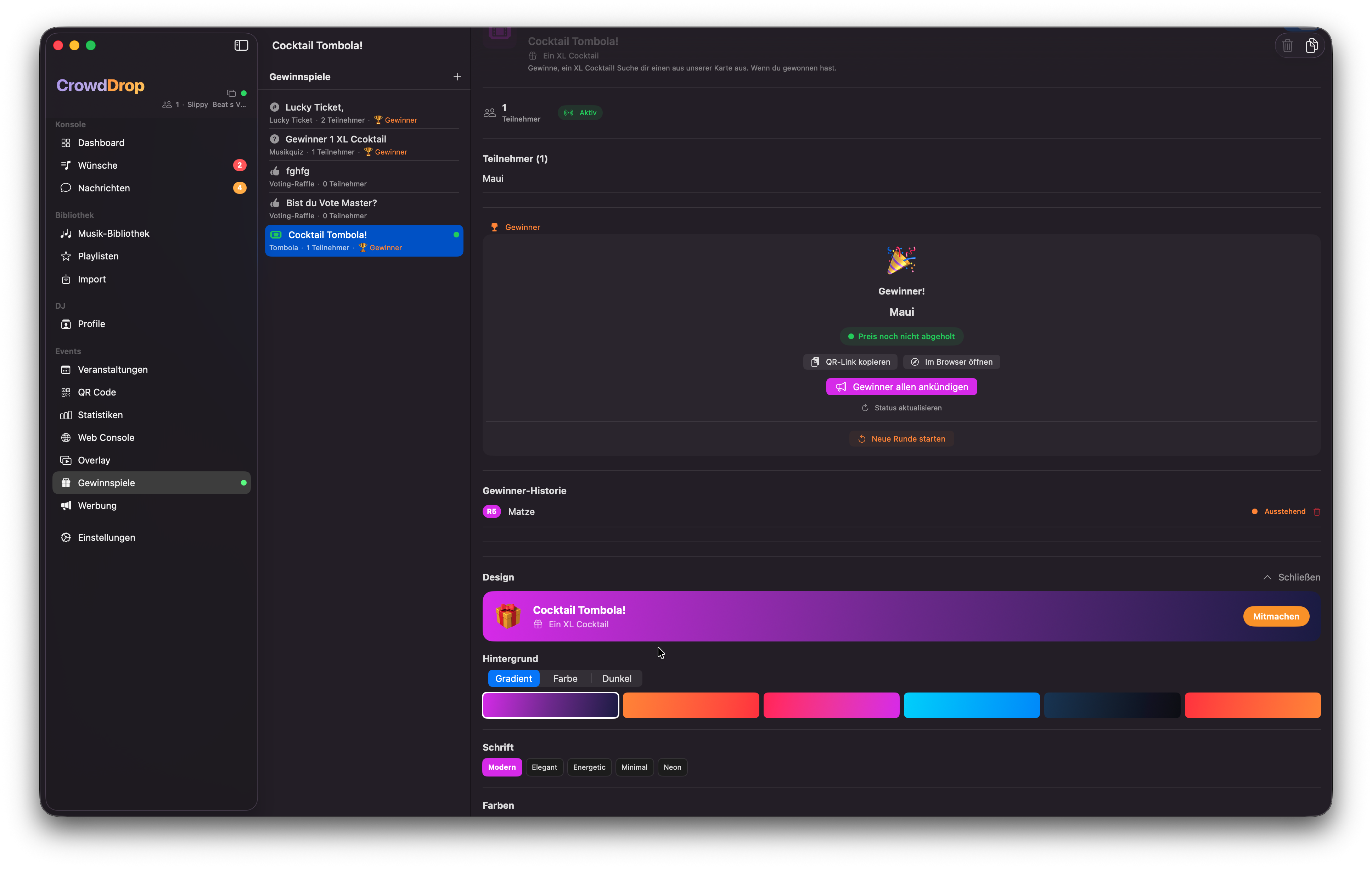
Gewinnspiele
Gewinnspiel-Übersicht mit Typ-Auswahl, Teilnehmerliste und Gewinner ziehenContest overview with type selection, participant list and drawing a winner
Wie funktionieren Gewinnspiele?How do contests work?
Du erstellst ein Gewinnspiel in der App, aktivierst es — und es erscheint sofort für alle Gäste in der PWA. Gäste nehmen teil, du siehst die Teilnehmerliste in Echtzeit und kannst per Knopfdruck einen Gewinner ziehen. Der Gewinner erhält einen einmaligen QR-Code, den das Personal an der Bar scannen kann.You create a contest in the app, activate it — and it immediately appears for all guests in the PWA. Guests participate, you see the participant list in real time and can draw a winner with one button press. The winner receives a one-time QR code that staff can scan at the bar.
🎲

Tombola

Klassische Verlosung. Jeder Gast nimmt teil, ein zufälliger Gewinner wird gezogen.Classic raffle. Every guest participates, a random winner is drawn.

🗳️

Voting-Raffle

Wer am meisten für Songs abgestimmt hat, gewinnt. Belohnt aktive Gäste.Whoever has voted most for songs wins. Rewards active guests.

🎵

Musik-Quiz

Du stellst eine Frage (z. B. "Welcher Artist sang X?"). Die erste richtige Antwort gewinnt.You ask a question (e.g. "Which artist sang X?"). The first correct answer wins.

🎟️

Lucky Ticket

Jeder Gast erhält eine automatische Ticketnummer. Du ziehst eine Gewinnnummer.Every guest gets an automatic ticket number. You draw a winning number.

💌

Beste NachrichtBest Message

Gäste schicken dir eine Nachricht (z. B. "Warum sollte ich gewinnen?"). Du wählst manuell deine Lieblingsantwort als Gewinner.Guests send you a message (e.g. "Why should I win?"). You manually pick your favourite answer as winner.
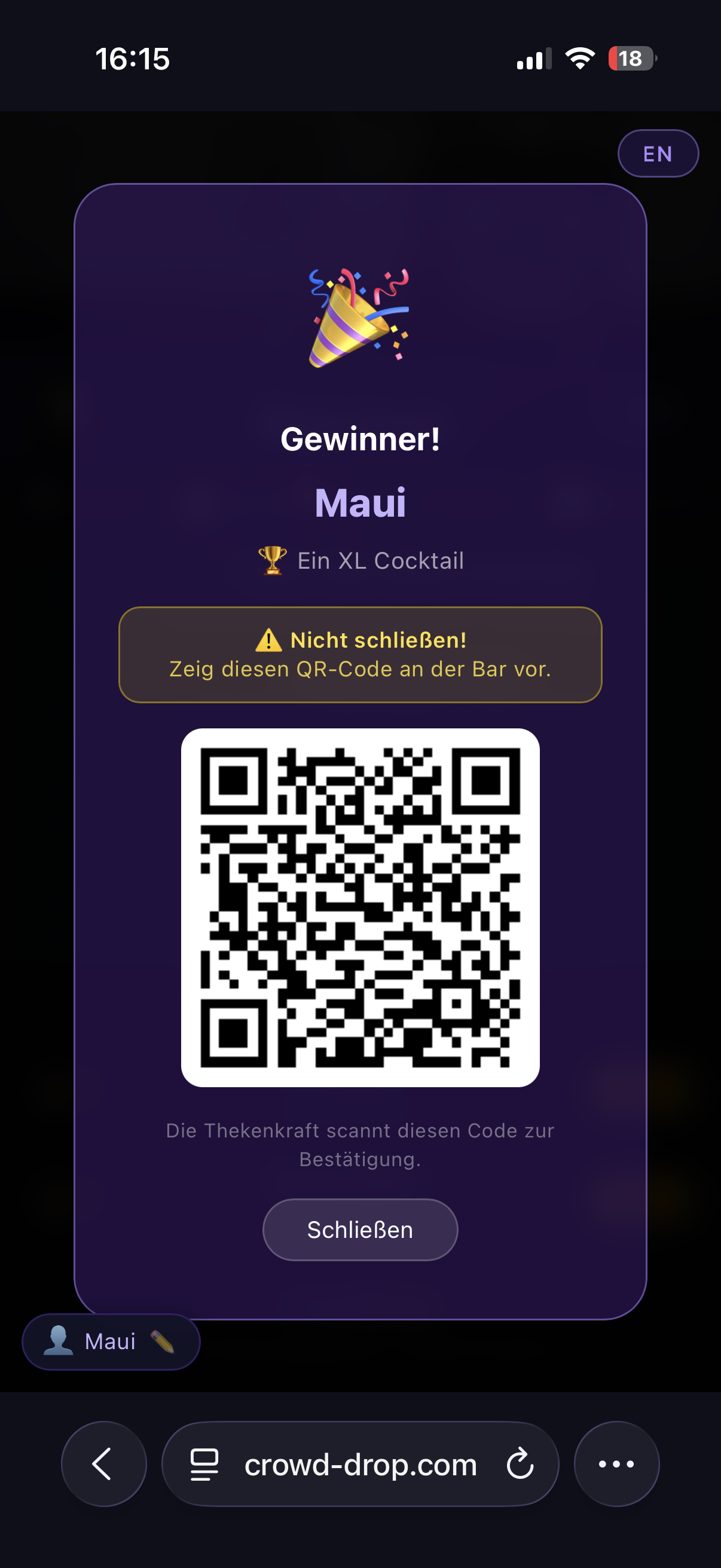
Gewinner-QR-Code & Bar-CheckWinner QR Code & Bar Check
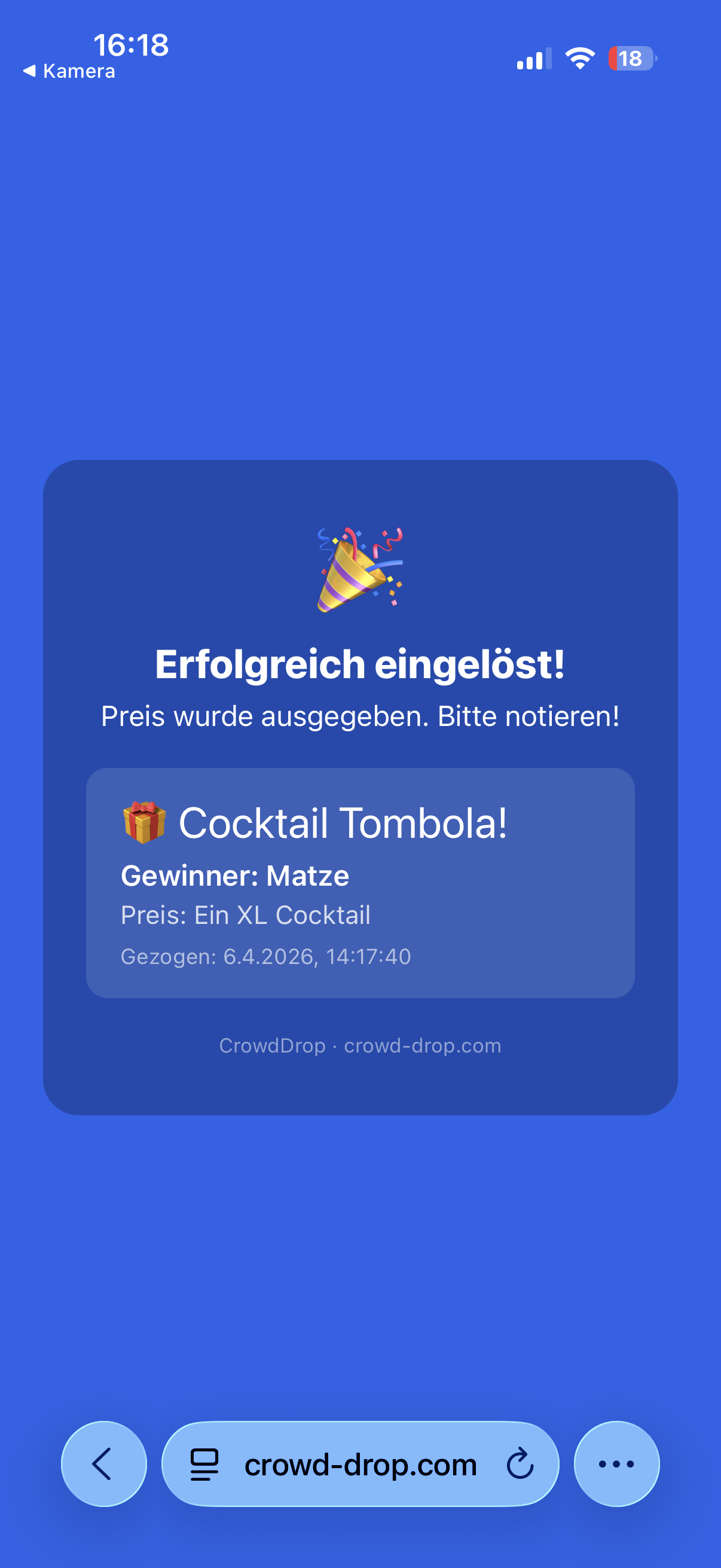
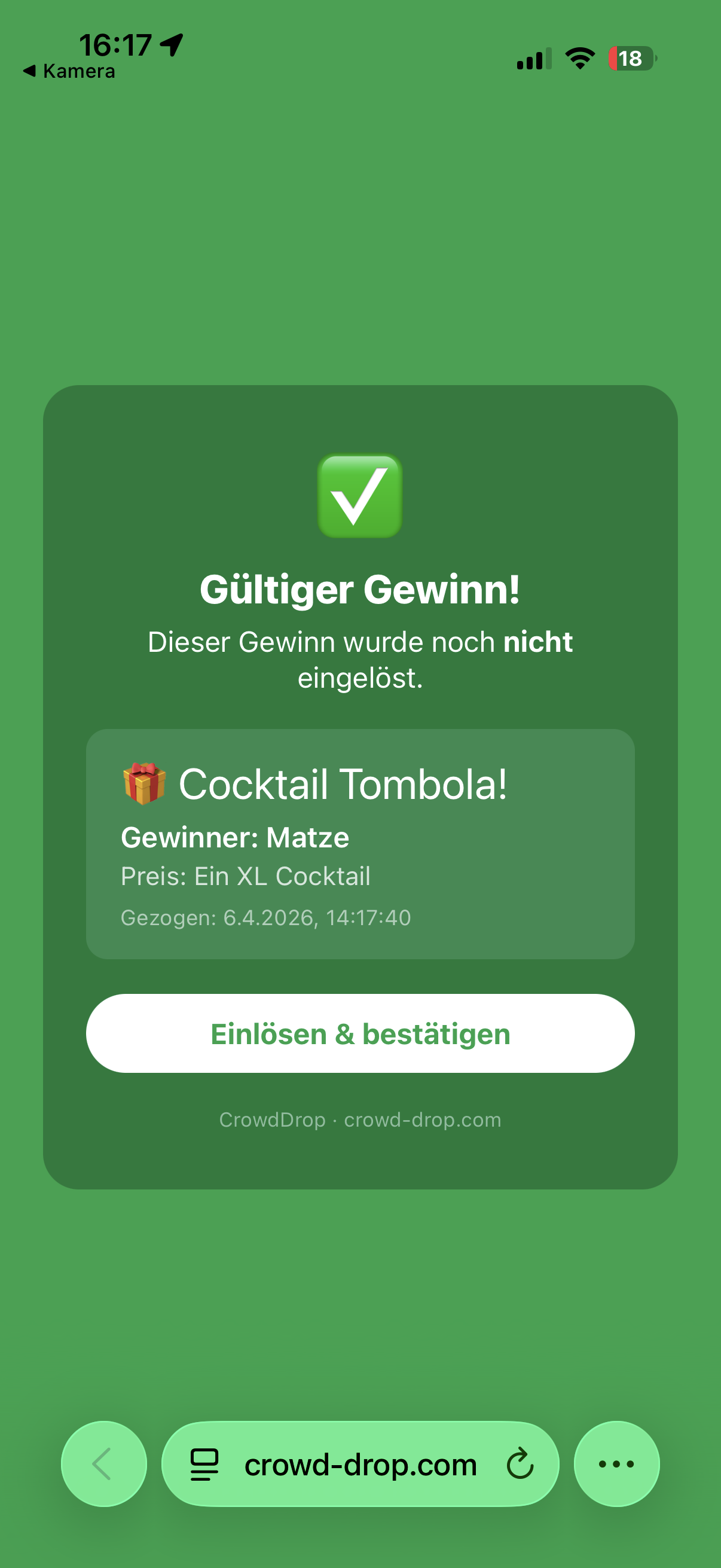
Jeder gezogene Gewinner erhält einen einmaligen QR-Code in der PWA. Das Personal an der Bar scannt den Code — bei gültigem Gewinn erscheint ein grünes Häkchen, bei bereits eingelöstem Gewinn ein rotes Kreuz. Kein doppeltes Einlösen möglich, auch nicht per Screenshot.Every drawn winner receives a one-time QR code in the PWA. Bar staff scans the code — a valid prize shows a green tick, an already redeemed prize shows a red cross. No double redemption possible, not even with a screenshot.
Gewinn QR-Code
Gewinn-QR-Code beim GastPrize QR code for guest
Bar Check
Gültigkeitsprüfung an der BarValidity check at the bar
Gäste benachrichtigenNotify Guests
Mit dem Toggle "Alle benachrichtigen wenn Gewinner gezogen" sendet CrowdDrop automatisch eine Push-Benachrichtigung an alle Gäste in der PWA sobald ein Gewinner feststeht.With the "Notify all when winner is drawn" toggle, CrowdDrop automatically sends a push notification to all guests in the PWA as soon as a winner is determined.
Gewinnbenachrichtigung
Automatische Benachrichtigung für den Gewinner auf dem SmartphoneAutomatic notification for the winner on the smartphone
📣
Werbung & AnkündigungenAds & Announcements
Banner und Fullscreen-Anzeigen in der Gäste-AppBanners and fullscreen ads in the guest app
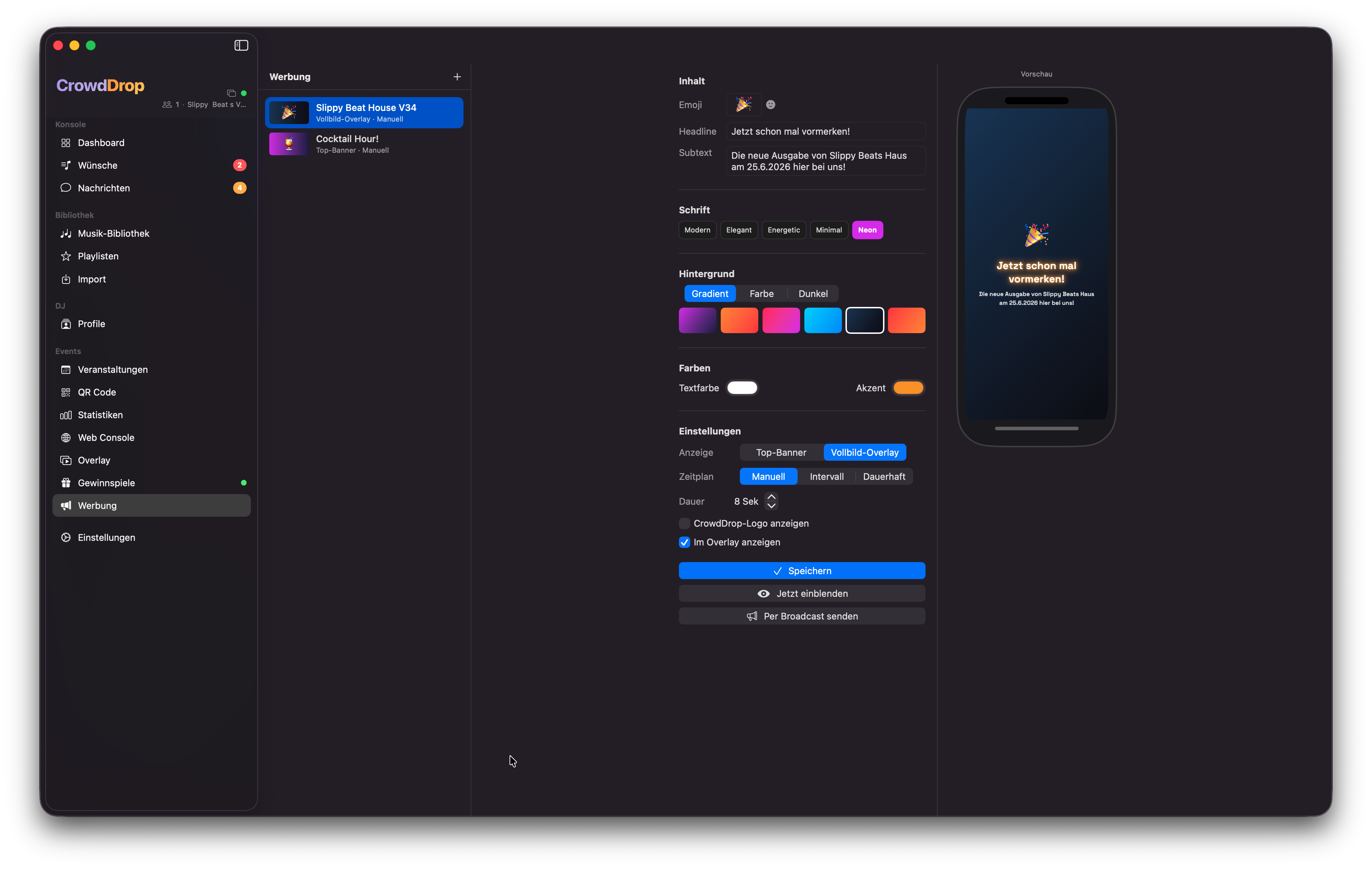
Werbung
Ad-Manager mit Banner-Vorschau und Anzeige-EinstellungenAd manager with banner preview and display settings
Anzeige-TypenAd Types

Banner

Schlanker Balken am oberen oder unteren Rand der Gäste-App. Dezent, immer sichtbar.Slim bar at the top or bottom of the guest app. Subtle, always visible.

Interstitial

Vollbild-Anzeige die über den gesamten Bildschirm geht. Maximale Sichtbarkeit.Fullscreen ad that covers the entire screen. Maximum visibility.

Anzeige-ModusDisplay Mode
  • ManuellManualDu schaltest die Anzeige per Knopfdruck ein und aus.You switch the ad on and off with a button press.
  • IntervallIntervalDie Anzeige erscheint automatisch alle X Sekunden/Minuten.The ad appears automatically every X seconds/minutes.
  • DauerhaftPermanentBanner ist ständig sichtbar sobald aktiviert.Banner is permanently visible once activated.
Stream Overlay-WidgetStream Overlay Widget
Werbung kann auch direkt im Stream Overlay angezeigt werden — als Widget neben Now Playing und Wunschliste. So erhalten Sponsoren Sichtbarkeit sowohl bei den Gästen als auch in deinem Livestream.Ads can also be displayed directly in the stream overlay — as a widget next to now playing and wishlist. This gives sponsors visibility both with guests and in your livestream.
📺
Stream Overlay
Professionelles OBS-Overlay für LivestreamsProfessional OBS overlay for livestreams
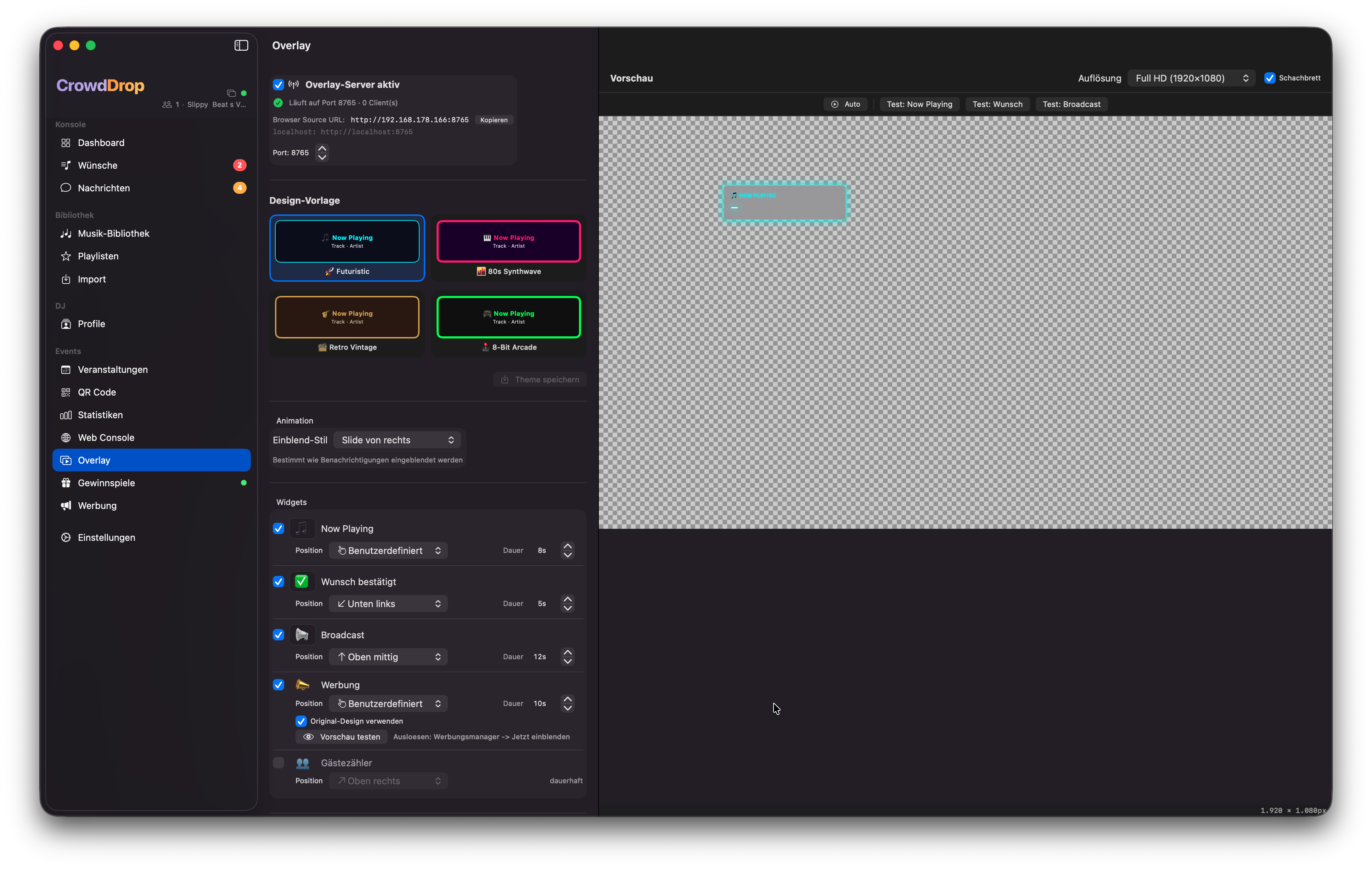
Overlay
Overlay-Designer mit Live-Vorschau, Theme-Auswahl und Widget-PositionenOverlay designer with live preview, theme selection and widget positions
Einbinden in OBSAdding to OBS
Der Overlay-Server läuft lokal auf deinem Mac (Standard-Port: 8765). In OBS fügst du eine Browser Source hinzu und gibst die angezeigte URL ein — fertig. Das Overlay aktualisiert sich bei jedem Track-Wechsel oder neuen Request automatisch.The overlay server runs locally on your Mac (default port: 8765). In OBS you add a browser source and enter the displayed URL — done. The overlay updates automatically on every track change or new request.
1
Overlay startenStart overlayIn CrowdDrop: Overlay → Server startenIn CrowdDrop: Overlay → Start server
2
URL kopierenCopy URLz. B. http://192.168.1.x:8765e.g. http://192.168.1.x:8765
3
OBS → Sources → Browser SourceURL einfügen, Breite/Höhe auf deine Auflösung setzenPaste URL, set width/height to your resolution
Themes & DesignThemes & Design
4 vorgefertigte Themes — alle vollständig anpassbar:4 pre-made themes — all fully customisable:

🔵 Futuristic

Neon-Blau, modernes Sci-Fi-Design. Perfekt für elektronische Musik und Club-Events.Neon blue, modern sci-fi design. Perfect for electronic music and club events.

🟣 Synthwave

Lila/Pink, 80er-Retrowave-Vibe. Passend für Retro-Events und Synthpop.Purple/pink, 80s retrowave vibe. Suits retro events and synthpop.

🟡 Retro Vintage

Gold/Bernstein, klassisch-elegantes Design. Ideal für Hochzeiten oder Jazz-Events.Gold/amber, classic elegant design. Ideal for weddings or jazz events.

🟢 Arcade

Grün/Matrix-Stil, Pixel-Ästhetik. Für Gaming-Events oder Oldschool-Hip-Hop.Green/matrix style, pixel aesthetic. For gaming events or old school hip-hop.

Widgets & AnimationenWidgets & Animations
  • Now PlayingAktuell gespielter Track mit Künstler.Currently playing track with artist.
  • WunschlisteWishlistDie Top-Wünsche mit Votes.Top requests with votes.
  • GästezahlGuest countAnzahl verbundener Gäste.Number of connected guests.
  • Werbungs-WidgetAd widgetSponsor-Banner direkt im Stream.Sponsor banner directly in stream.
18 Animationen stehen zur Auswahl: Slide, Fade, Zoom, Bounce, 3D Flip, Glitch, Neon, Typewriter und mehr. Jedes Widget hat eine eigene Position — entweder als feste Preset-Position oder per Drag & Drop in der Live-Vorschau frei positionierbar.18 animations available: Slide, Fade, Zoom, Bounce, 3D Flip, Glitch, Neon, Typewriter and more. Each widget has its own position — either as a fixed preset position or freely positioned by drag & drop in the live preview.
🪟
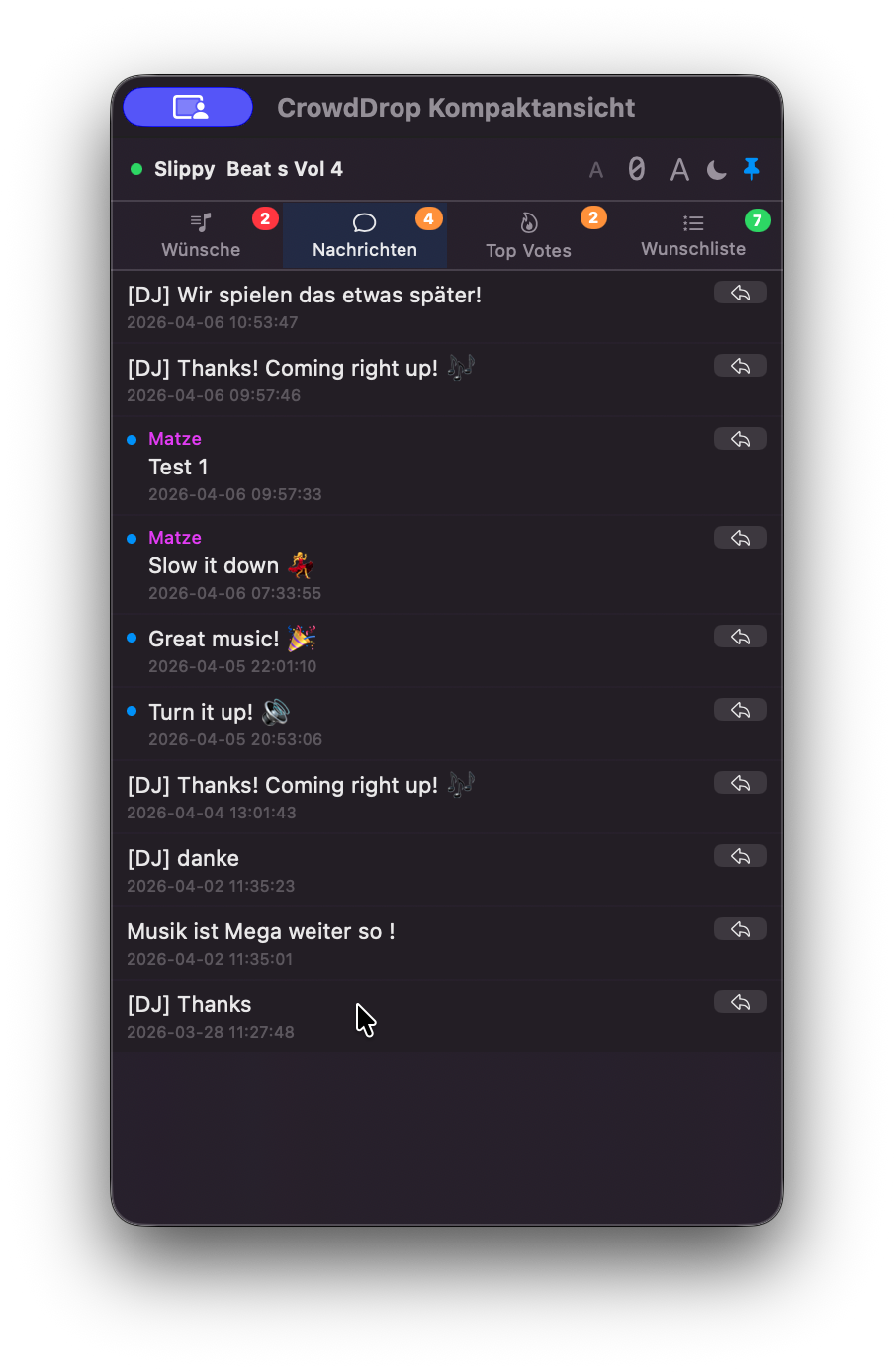
KompaktansichtCompact View
Das Floating-Fenster für den DJ-MonitorThe floating window for the DJ monitor
Kompaktansicht Wünsche
Wünsche-TabRequests tab
Kompaktansicht Nachrichten
Nachrichten-TabMessages tab
Wofür ist die Kompaktansicht?What is the compact view for?
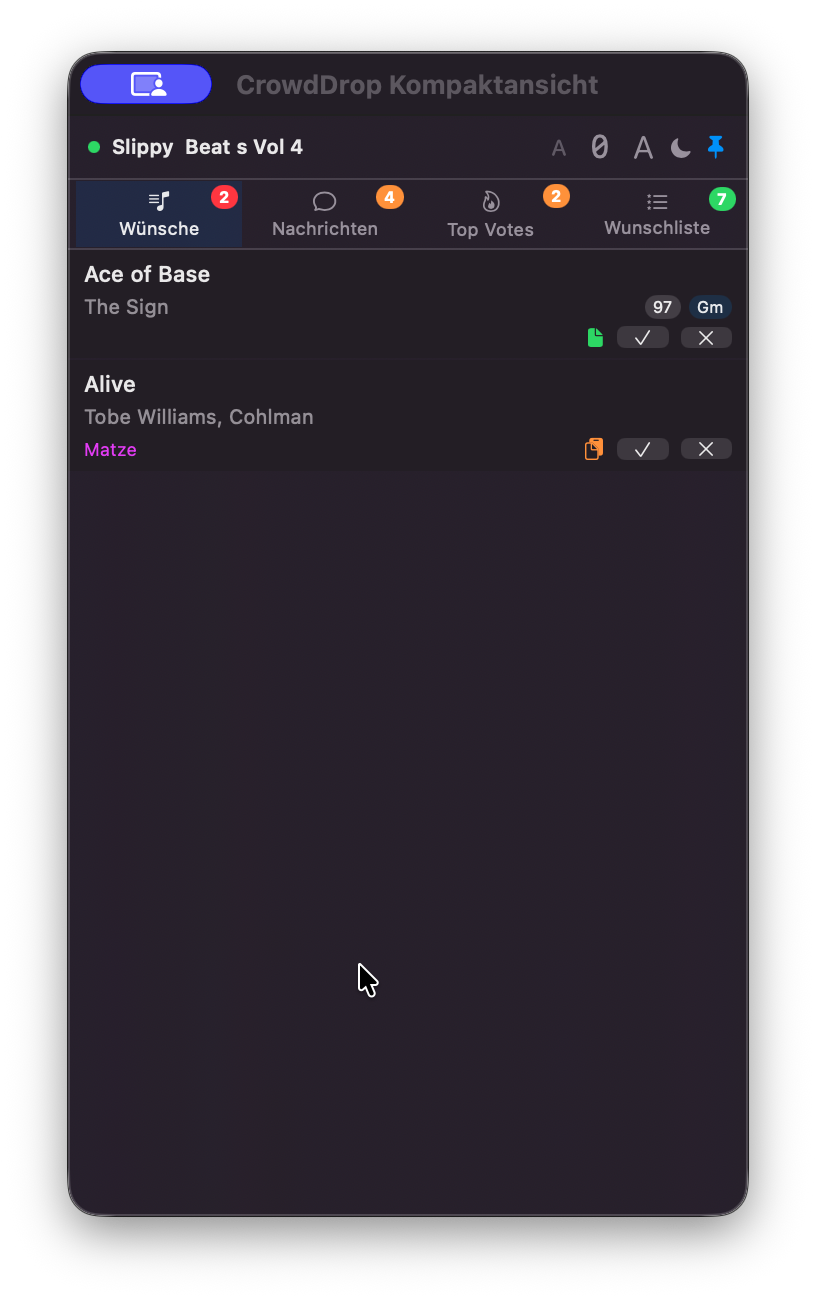
Die Kompaktansicht ist ein kleines 320×600 Pixel Floating-Fenster, das du auf deinem zweiten Monitor oder am Rand des Hauptmonitors platzieren kannst. Es zeigt alle wichtigen Infos auf einen Blick — ohne die Hauptapp öffnen zu müssen.The compact view is a small 320×600 pixel floating window you can place on your second monitor or at the edge of your main monitor. It shows all important info at a glance — without needing to open the main app.
  • Wünsche-TabRequests tabAlle pending Requests, sortiert nach Votes, mit Confirm/Decline-Buttons.All pending requests, sorted by votes, with confirm/decline buttons.
  • Nachrichten-TabMessages tabUngelesene Gästenachrichten — mit Antwort-Option.Unread guest messages — with reply option.
  • Top Votes-TabTop votes tabDie meistgewünschten Tracks als Schnellübersicht.The most requested tracks as a quick overview.
  • Wunschliste-TabWishlist tabVollständige Wunschliste mit Drag & Drop in DJ-Software.Full wishlist with drag & drop into DJ software.
💡Die Kompaktansicht öffnest du über den Button oben links in der Sidebar der Hauptapp.Open the compact view via the button at the top left of the main app's sidebar.
📈
StatistikenStatistics
Dein komplettes Event-ArchivYour complete event archive
Statistiken
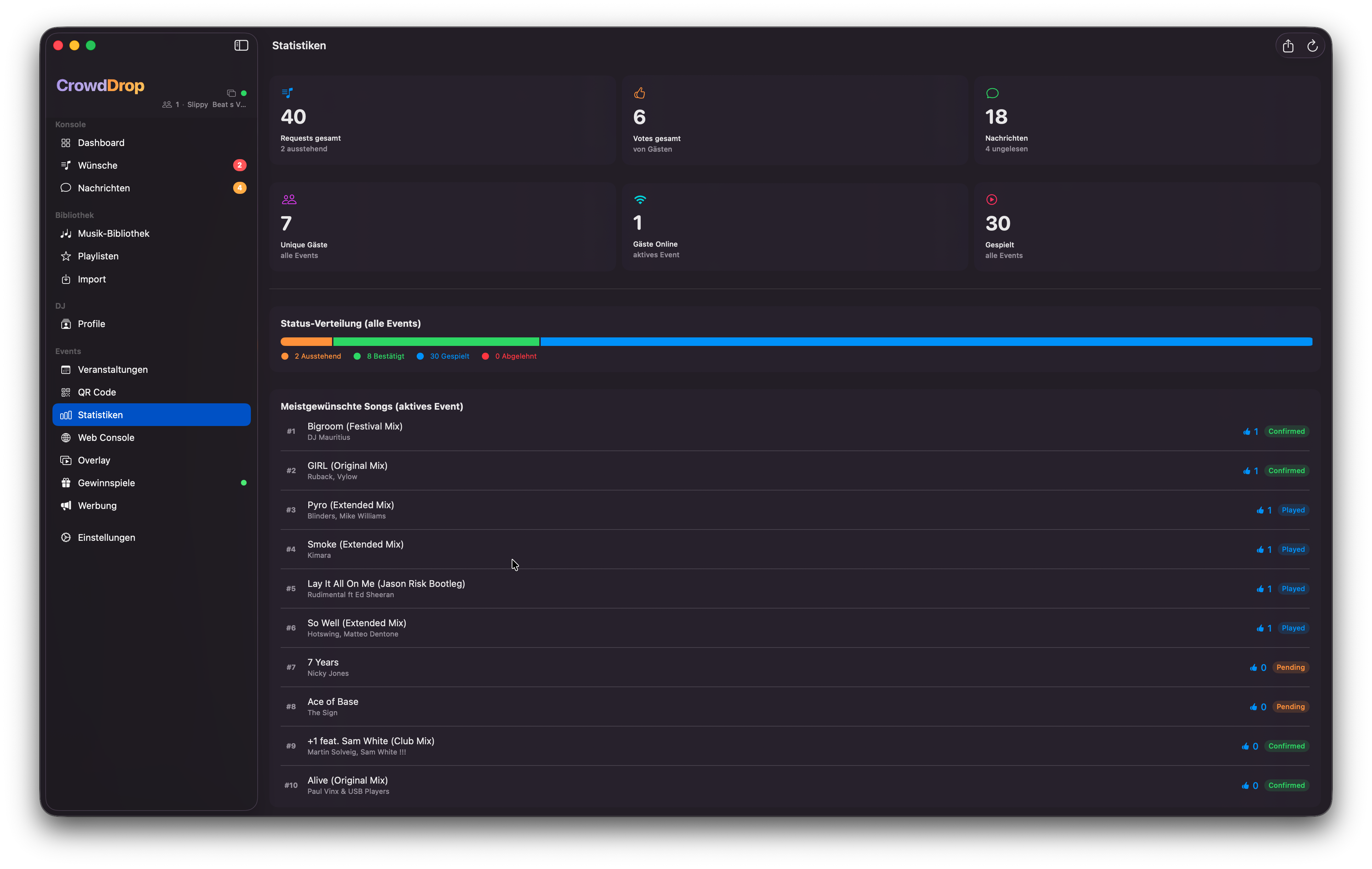
Statistiken mit aggregierten Kennzahlen, Status-Breakdown und Top-SongsStatistics with aggregated metrics, status breakdown and top songs
Was wird angezeigt?What is displayed?
  • Aggregierte KennzahlenAggregated metricsGesamt-Requests, Bestätigt, Gespielt, Abgelehnt, Nachrichten und Gäste über alle Events summiert.Total requests, confirmed, played, declined, messages and guests summed across all events.
  • Status-BreakdownStatus breakdownHorizontaler Farbbalken zeigt die Verteilung aller Request-Status in Prozent.Horizontal colour bar shows the distribution of all request statuses in percent.
  • Top-SongsTop songsDie meistgewünschten Tracks des aktuellen Events, sortiert nach Votes.The most requested tracks of the current event, sorted by votes.
  • Per-Event-AufschlüsselungPer-event breakdownBei mehreren Events: Tabelle mit Kennzahlen für jedes einzelne Event.With multiple events: table with metrics for each individual event.
CSV-Export
Alle Statistiken können als CSV-Datei exportiert werden — inkl. vollständiger Request-Liste mit Gastname, Track, Status, Zeitstempel und Votes. Ideal zur Nachbereitung oder für Booking-Unterlagen.All statistics can be exported as a CSV file — including a complete request list with guest name, track, status, timestamp and votes. Ideal for follow-up or booking documentation.
🔲
QR-Code
Der Eintrittscode für deine GästeThe entry code for your guests
QR-Code
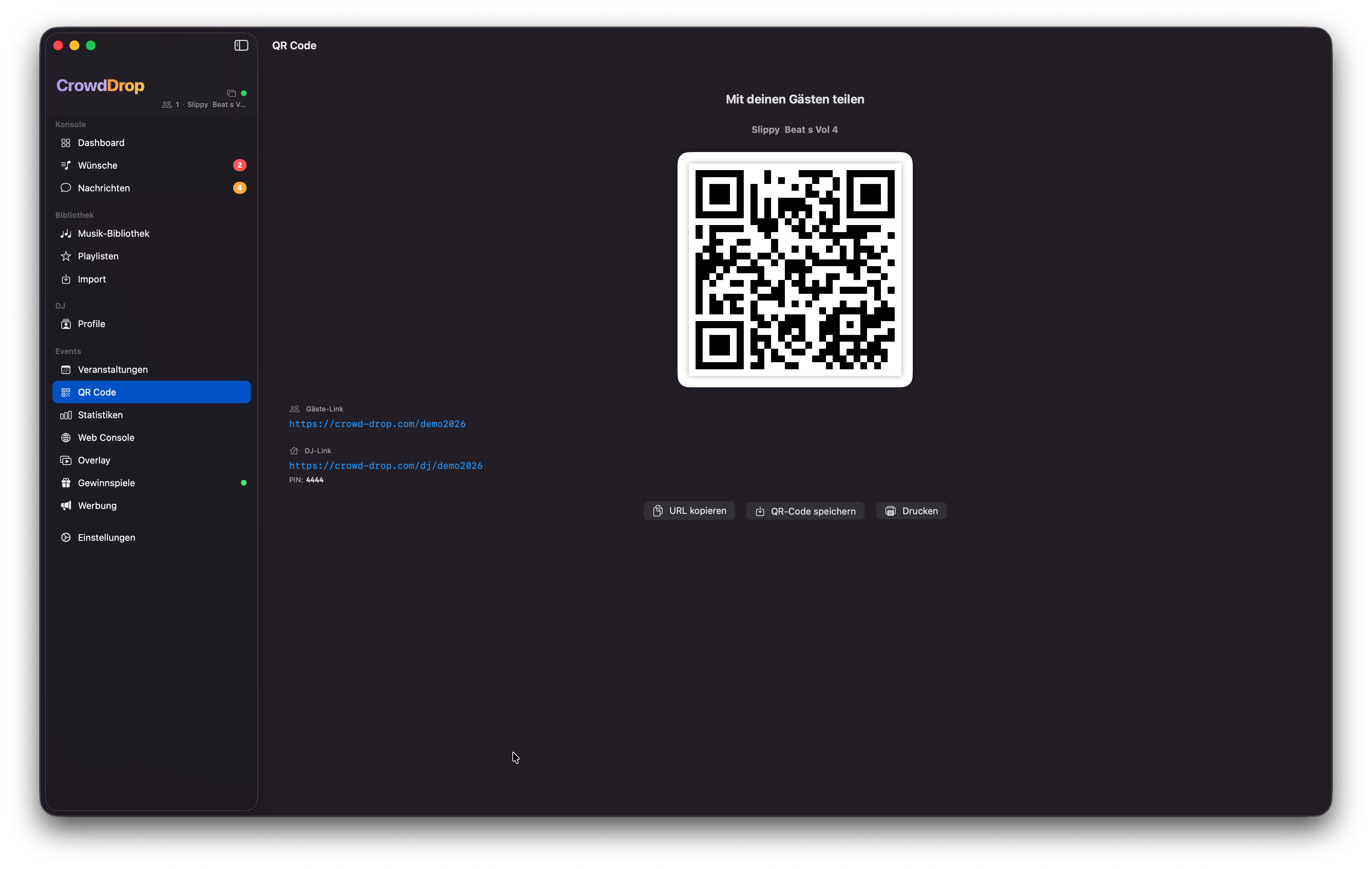
QR-Code Generator mit Kopieren, Speichern und DruckenQR code generator with copy, save and print
QR-Code verwendenUsing the QR Code
Jedes Event hat einen einzigartigen QR-Code. Gäste scannen ihn mit dem Smartphone und landen direkt in der Gäste-PWA — kein App-Download, keine Registrierung nötig.Every event has a unique QR code. Guests scan it with their smartphone and land directly in the guest PWA — no app download, no registration needed.
  • URL kopierenCopy URLEvent-URL in die Zwischenablage kopieren (z. B. für Einladungen).Copy event URL to clipboard (e.g. for invitations).
  • Als PNG speichernSave as PNGQR-Code als Bild speichern für Flyer, Screens oder Drucke.Save QR code as image for flyers, screens or prints.
  • DruckenPrintDirekt aus der App drucken — für Tischkarten oder Ausdrucke.Print directly from the app — for table cards or printouts.
🖨️
QR-Code Print EditorQR Code Print Editor
Professionelle Druckvorlagen direkt aus der AppProfessional print templates directly from the app
QR Code Print Editor
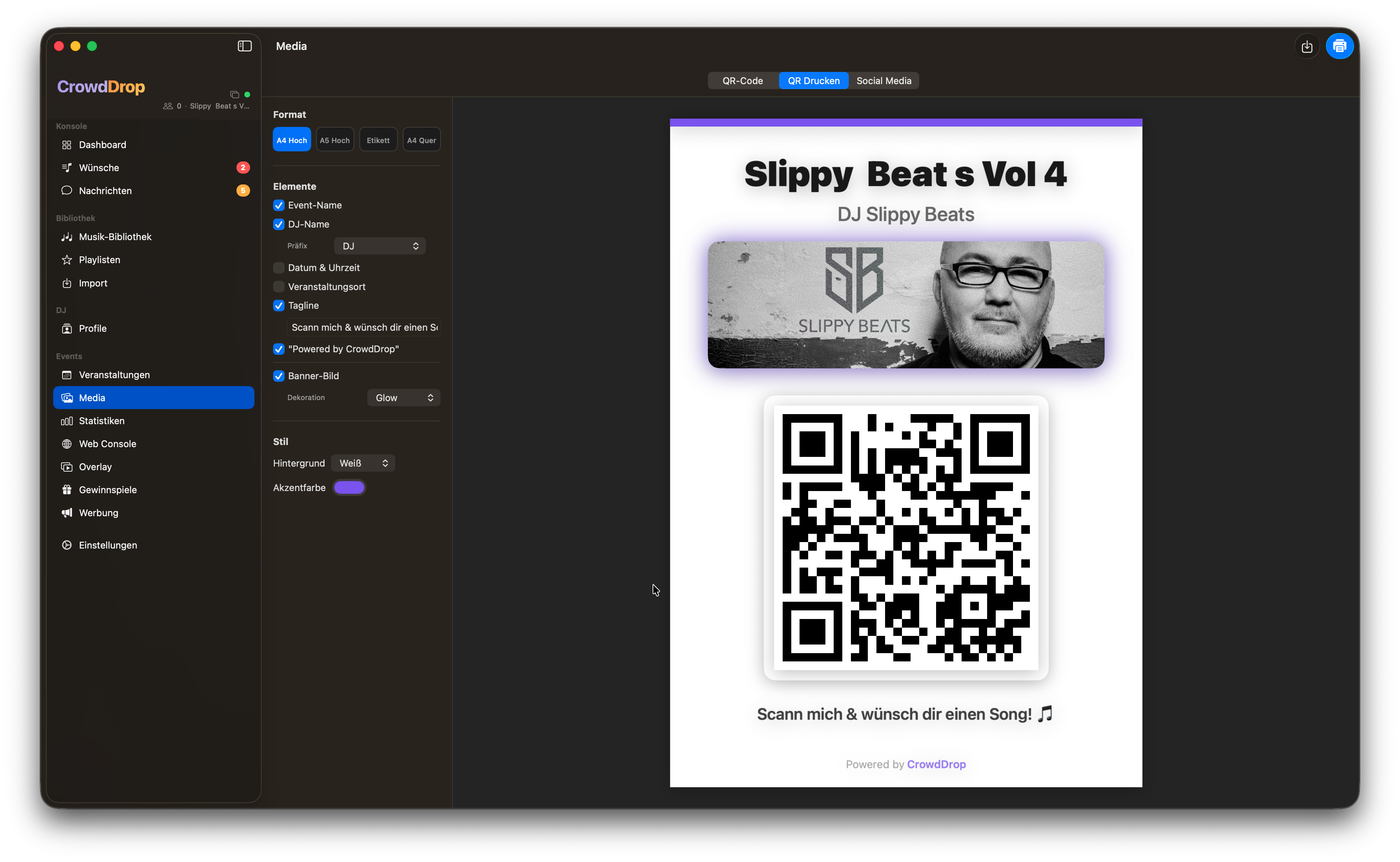
QR-Code Print Editor mit Live-Vorschau, Elementen-Toggles und DruckfunktionQR code print editor with live preview, element toggles and print function
Was ist der QR Print Editor?What is the QR Print Editor?
Der QR Print Editor verwandelt den blanken QR-Code in eine druckfertige, professionell gestaltete Vorlage — mit Eventname, DJ-Name, Datum, Banner und mehr. Kein externes Design-Tool nötig.The QR Print Editor turns the bare QR code into a print-ready, professionally designed template — with event name, DJ name, date, banner and more. No external design tool needed.
DrucklayoutsPrint Layouts
Vier Vorlagen stehen zur Auswahl, die sich per Klick wechseln lassen:Four templates are available, switchable with a click:
  • Poster A4 (Hochformat)Poster A4 (Portrait)Ideal für Tischaufsteller oder Wandaushänge.Ideal for table stands or wall displays.
  • Flyer A5 (Hochformat)Flyer A5 (Portrait)Handzettel oder Bar-Karte zum Verteilen.Handout or bar card to distribute.
  • Ticket-Label (89×130 mm)Ticket Label (89×130 mm)Perfekt für Eintrittskarten oder Etiketten.Perfect for tickets or labels.
  • Banner Quer (A4 Querformat)Banner Landscape (A4 Landscape)Für Beamer- oder TV-Einblendungen.For projector or TV displays.
Konfigurierbare ElementeConfigurable Elements
Jedes Element kann per Toggle ein- oder ausgeblendet werden. Die Vorschau aktualisiert sich sofort.Each element can be toggled on or off. The preview updates immediately.
  • Event-NameEvent NameSchriftart, Schriftgröße und Farbe anpassbar.Font, size and colour customisable.
  • DJ-NameDJ NameMit wählbarem Präfix: „DJ", „Hosted by", „presented by" oder frei.With selectable prefix: "DJ", "Hosted by", "presented by" or custom.
  • Datum & UhrzeitDate & TimeAutomatisch aus dem Event befüllt, Datumsformat wählbar.Auto-filled from the event, date format selectable.
  • VeranstaltungsortVenueLocation-Name, bis zu zwei Zeilen.Location name, up to two lines.
  • Banner / LogoBanner / LogoDas Event-Banner aus den Einstellungen, oben oder unten positionierbar.The event banner from settings, positionable top or bottom.
  • Tagline / CalloutTagline / CalloutFreier Text, z. B. „Scann mich!" — als Badge, kursiv oder fett.Free text, e.g. "Scan me!" — as badge, italic or bold.
  • HintergrundBackgroundEinfarbig, Farbverlauf oder eigenes Hintergrundbild.Solid colour, gradient or custom background image.
  • CrowdDrop-BrandingCrowdDrop branding„Powered by CrowdDrop"-Zeile, in Pro deaktivierbar."Powered by CrowdDrop" line, deactivatable in Pro.
Export & DruckenExport & Print
  • DruckenPrintDirekt an jeden verbundenen Drucker senden (300 DPI, druckoptimiertes PDF).Send directly to any connected printer (300 DPI, print-optimised PDF).
  • Als PDF speichernSave as PDFDruckfertige PDF-Datei für Druckereien oder spätere Verwendung.Print-ready PDF for print shops or later use.
  • Als PNG exportierenExport as PNGHochauflösendes Bild für digitale Verwendung, z. B. auf Beamer oder TV.High-resolution image for digital use, e.g. on projector or TV.
💡Alle Einstellungen werden gespeichert und beim nächsten Öffnen wiederhergestellt — kein erneutes Konfigurieren nötig.All settings are saved and restored next time you open it — no need to reconfigure.
📸
Social Media CreatorSocial Media Creator
Instagram- & Facebook-Grafiken in Sekunden erstellenCreate Instagram & Facebook graphics in seconds
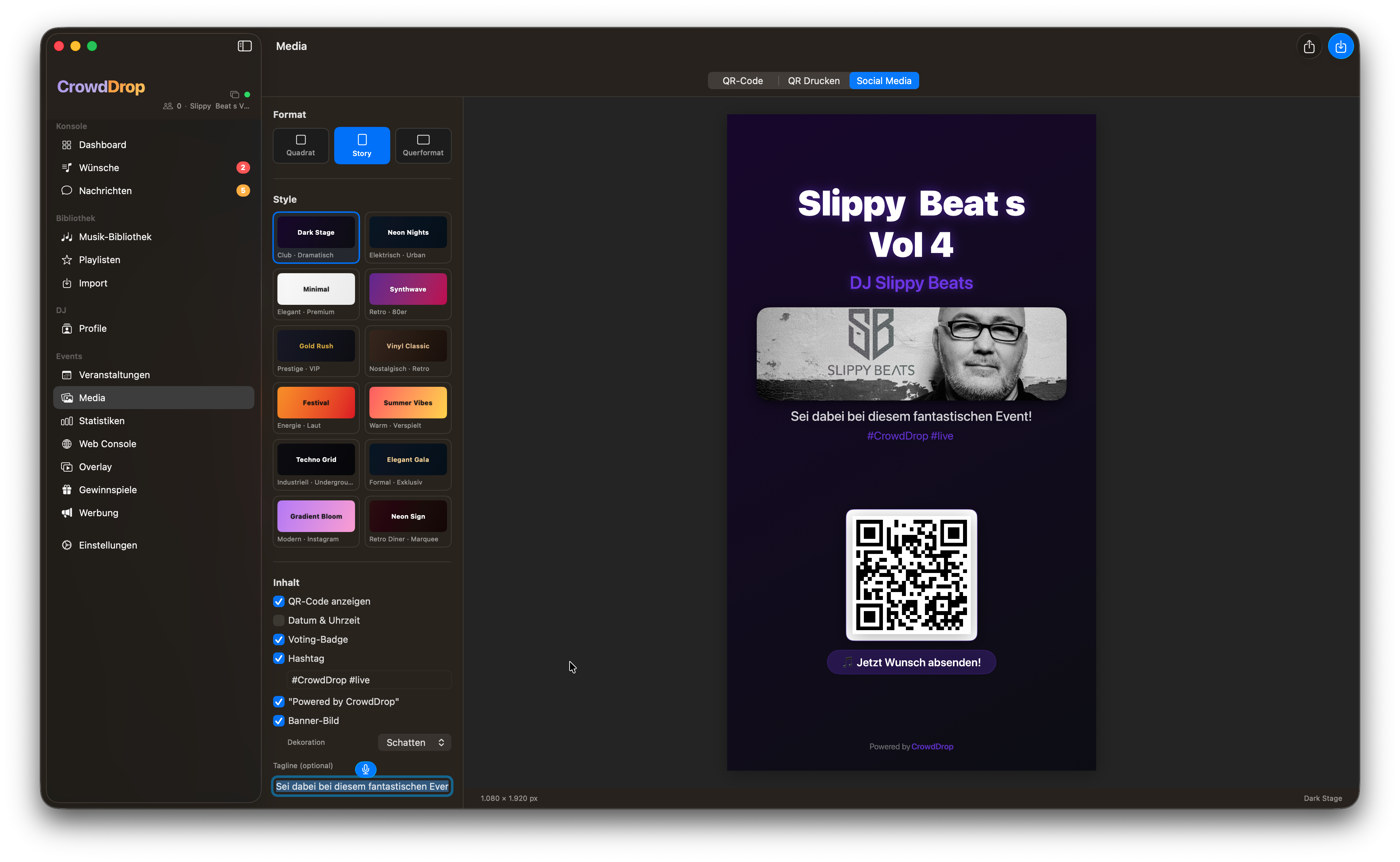
Social Media Creator
Social Media Creator mit Style-Auswahl, Live-Editor und Format-UmschaltungSocial Media Creator with style selection, live editor and format switching
Was ist der Social Media Creator?What is the Social Media Creator?
Mit dem Social Media Creator erstellst du professionelle Event-Grafiken für Instagram und Facebook direkt aus der App — ohne Canva, Photoshop oder externe Tools. Event-Name, DJ-Name, Datum und dein Branding werden automatisch eingefüllt. Du wählst einen Style, passt ihn an und teilst ihn mit einem Klick.The Social Media Creator lets you create professional event graphics for Instagram and Facebook directly from the app — no Canva, Photoshop or external tools needed. Event name, DJ name, date and your branding are filled in automatically. Pick a style, customise it and share with one click.
ExportformateExport Formats
  • Instagram Feed / Universal — 1080 × 1080 px (1:1)
  • Instagram & Facebook Stories / Reels — 1080 × 1920 px (9:16)
  • Facebook Feed & Link-Vorschau — 1200 × 630 px (1.91:1)
💡Das Format lässt sich jederzeit per Klick umschalten — die Grafik passt sich live an, ohne dass Einstellungen verloren gehen.The format can be switched at any time with a click — the graphic adjusts live without losing any settings.
12 vordefinierte Styles12 Predefined Styles
Wähle aus 12 fertigen Designs, die alle Event-Daten automatisch übernehmen:Choose from 12 ready-made designs that automatically pull in all event data:
  • Dark StageSchwarz + lila Spotlight-Gradient, Space Grotesk Bold. Ideal für Clubs und DJ-Abende.Black + purple spotlight gradient, Space Grotesk Bold. Ideal for clubs and DJ nights.
  • Neon NightsDunkel-Navy mit Cyan & Pink Neon-Glow. Für Techno und EDM.Dark navy with cyan & pink neon glow. For techno and EDM.
  • MinimalReines Weiß, Playfair Display, viel Weißraum. Für Hochzeiten und Gala-Events.Pure white, Playfair Display, lots of white space. For weddings and gala events.
  • SynthwaveLila-Pink-Gradient mit Retro-Raster. Für 80er-Partys.Purple-pink gradient with retro grid. For 80s parties.
  • Gold RushAnthrazit mit echtem Gold (#D4AF37). Für VIP-Events und Silvester.Charcoal with real gold (#D4AF37). For VIP events and New Year's.
  • Vinyl ClassicWarmes Sepia mit Vinyl-Record-Element. Für Oldies, 60er–70er.Warm sepia with vinyl record element. For oldies, 60s–70s.
  • Festival PosterGelb-Orange-Rot Farbblöcke, Bebas Neue. Für Festivals und Open-Air.Yellow-orange-red colour blocks, Bebas Neue. For festivals and open-air events.
  • Summer VibesKoralle → Goldgelb Diagonal, Nunito Rounded. Für Sommer-Partys.Coral → golden yellow diagonal, Nunito Rounded. For summer parties.
  • Techno GridFast-Schwarz mit Gitterlinien und Cyan-Akzent. Für Techno und Underground.Near-black with grid lines and cyan accent. For techno and underground.
  • Elegant GalaMitternachts-Blau, Cormorant Garamond, dünner Gold-Rahmen. Für Galas.Midnight blue, Cormorant Garamond, thin gold frame. For galas.
  • Gradient BloomPastell-Gradient lila-rosa-pfirsich, Poppins. Instagram-native.Pastel gradient purple-pink-peach, Poppins. Instagram-native.
  • Neon SignDunkles Ziegelrot, Neonröhren-Texteffekt. Für Retro-Diner und Karaoke.Dark brick red, neon tube text effect. For retro diner and karaoke.
Editor — Was lässt sich anpassen?Editor — What can be customised?
  • HintergrundBackgroundFarbe, Gradient oder eigenes Foto als Hintergrund, mit einstellbarer Deckkraft.Colour, gradient or your own photo as background, with adjustable opacity.
  • TextelementeText elementsEvent-Name, DJ-Name, Datum, Ort, Hashtags — jedes einzeln ein-/ausblendbar, mit eigenem Font, Größe und Farbe.Event name, DJ name, date, venue, hashtags — each individually toggleable, with its own font, size and colour.
  • 15 Schriftarten15 typefacesSpace Grotesk, Inter, Poppins, Playfair Display, Cormorant Garamond, Orbitron, Archivo Black, Nunito, Space Mono, u. v. m. — alle kostenlos eingebaut.Space Grotesk, Inter, Poppins, Playfair Display, Cormorant Garamond, Orbitron, Archivo Black, Nunito, Space Mono and more — all built in, free.
  • Glow & SchattenGlow & shadowTexteffekte per Toggle aktivierbar für Neon- oder dramatische Looks.Text effects activatable per toggle for neon or dramatic looks.
  • Voting-CTA-BadgeVoting CTA badge„Jetzt abstimmen!" / „Vote now!" Pill-Button mit der direkten Event-URL."Jetzt abstimmen!" / "Vote now!" pill button with the direct event URL.
  • QR-Code einblendenShow QR codeOptional: Der scanbare QR-Code erscheint in der Grafik, sodass Gäste ihn direkt vom Instagram-Post scannen können.Optional: the scannable QR code appears in the graphic so guests can scan it directly from the Instagram post.
  • Banner / LogoBanner / LogoEvent-Banner oder DJ-Logo einblenden.Show event banner or DJ logo.
Teilen & ExportierenShare & Export
  • Grafik exportieren & teilenExport & share graphicÖffnet das macOS Share Sheet: direkt an Instagram, Facebook, WhatsApp, AirDrop oder in Fotos speichern.Opens the macOS Share Sheet: share directly to Instagram, Facebook, WhatsApp, AirDrop or save to Photos.
  • Als Vorlage speichernSave as templateDeine Einstellungen als eigene Vorlage speichern und für zukünftige Events wiederverwenden.Save your settings as a custom template and reuse them for future events.
ℹ️Die Grafik wird in voller Auflösung gerendert (1080 × 1080 px, 1080 × 1920 px oder 1200 × 630 px) — bereit für jede Plattform ohne Qualitätsverlust.The graphic is rendered at full resolution (1080 × 1080 px, 1080 × 1920 px or 1200 × 630 px) — ready for every platform without quality loss.
👤
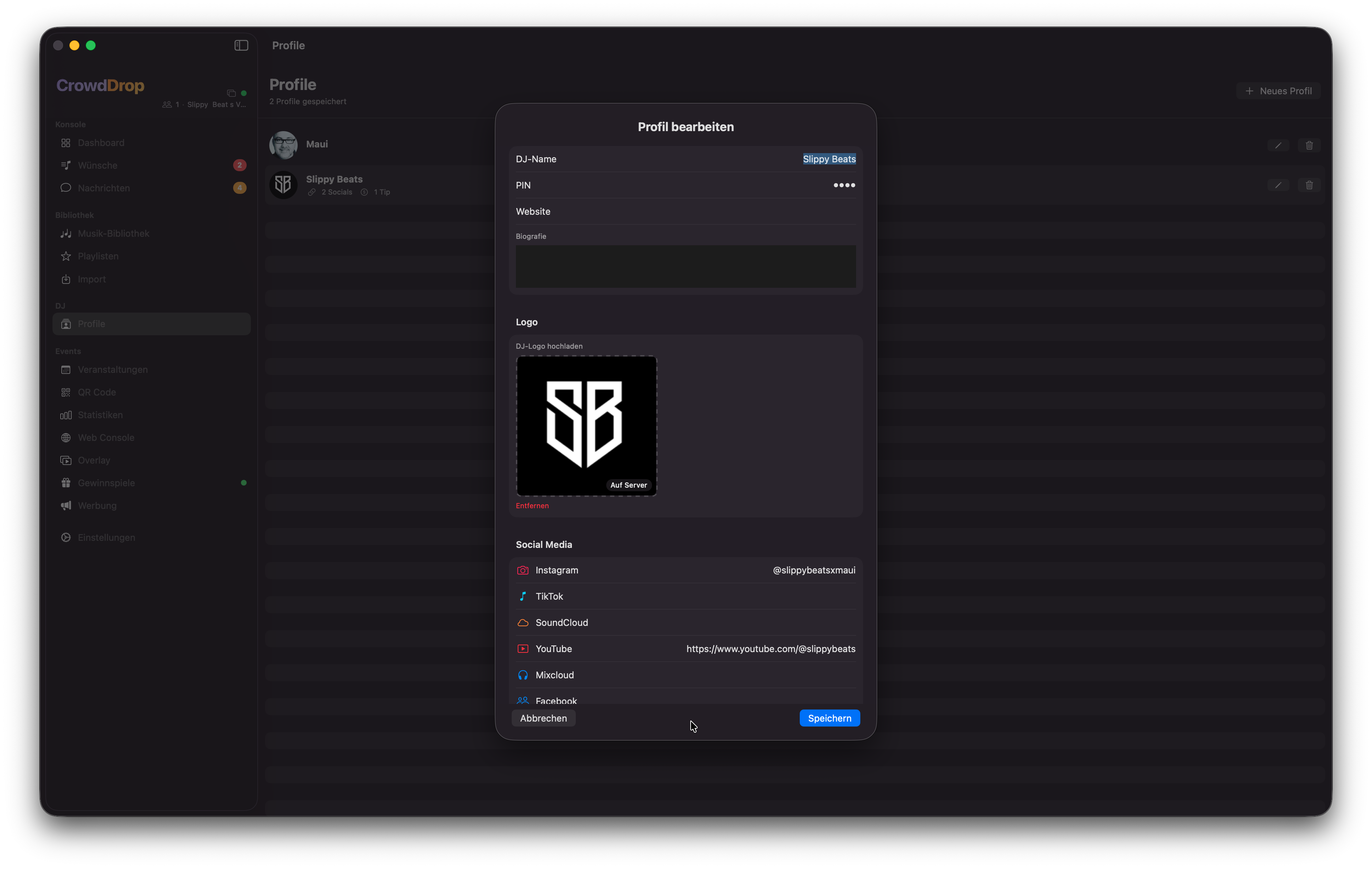
DJ-ProfileDJ Profiles
Branding, Socials & TrinkgeldBranding, socials & tipping
Profile
DJ-Profil-Editor mit Logo, Social Media Links und Trinkgeld-EinstellungenDJ profile editor with logo, social media links and tipping settings
Was enthält ein DJ-Profil?What does a DJ profile contain?
Ein DJ-Profil fasst dein Branding für ein Event zusammen. Es wird mit dem Event verknüpft und erscheint in der Gäste-PWA.A DJ profile bundles your branding for an event. It's linked to the event and appears in the guest PWA.
  • LogoDein DJ-Logo oder Profilbild.Your DJ logo or profile picture.
  • Bio & WebsiteBio & websiteKurze Beschreibung und Link zu deiner Website.Short description and link to your website.
  • Social MediaInstagram, TikTok, SoundCloud, YouTube, Mixcloud, Facebook, WhatsApp.Instagram, TikTok, SoundCloud, YouTube, Mixcloud, Facebook, WhatsApp.
  • TrinkgeldTippingPayPal, Venmo, Cash App, Revolut oder eigene URL. Gäste können dir direkt ein Trinkgeld schicken.PayPal, Venmo, Cash App, Revolut or custom URL. Guests can tip you directly.
💡Das Trinkgeld-Feature ist per Event aktivierbar. Es erscheint nur in der Gäste-App wenn es eingeschaltet ist.The tipping feature is activatable per event. It only appears in the guest app when switched on.
🌐
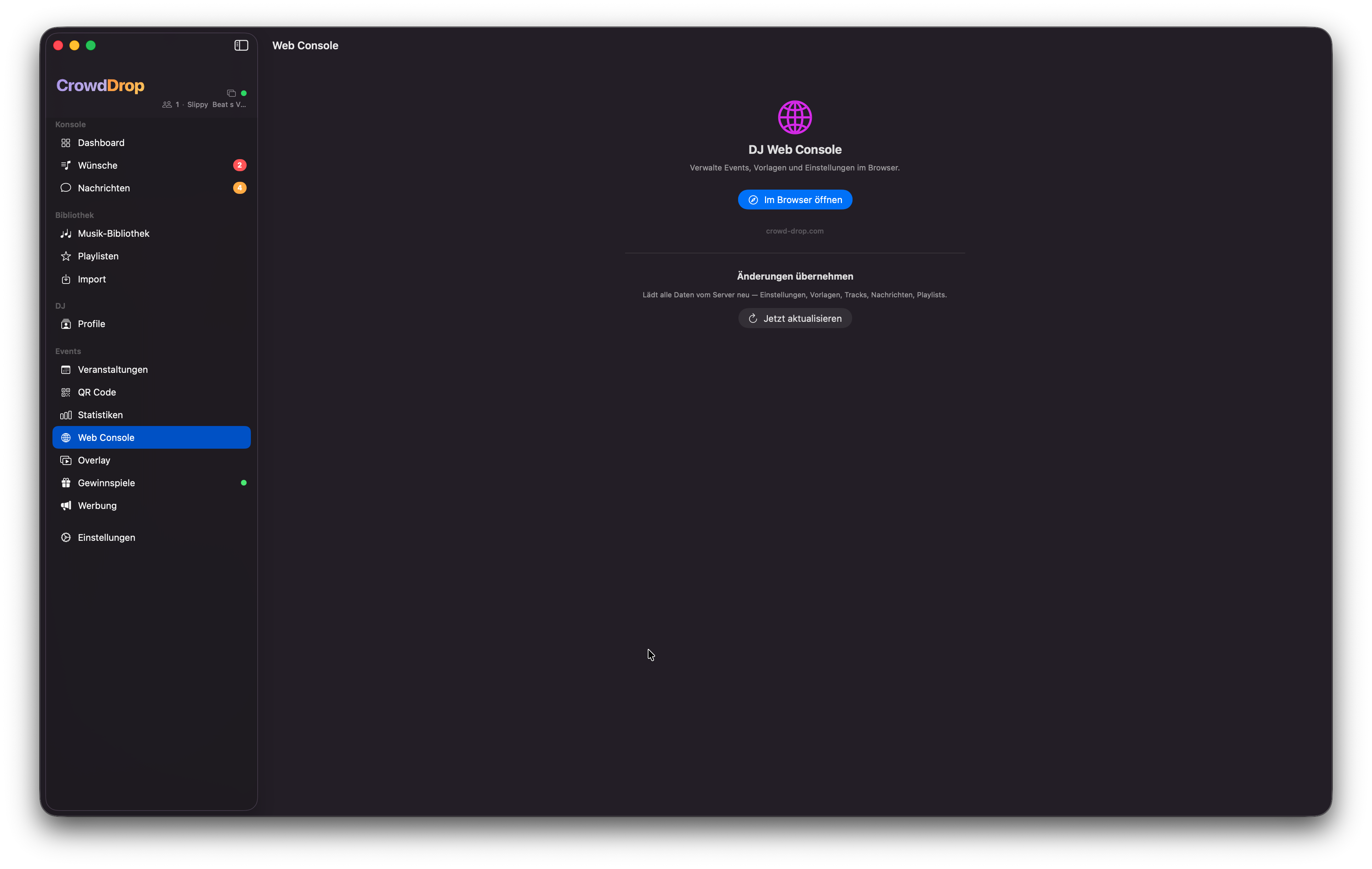
Web Console
Die volle DJ-Konsole im Browser — auch für WindowsThe full DJ console in the browser — for Windows too
Web Console
Web Console unter crowd-drop.com/console — vollständige Funktionalität im BrowserWeb Console at crowd-drop.com/console — full functionality in the browser
Was kann die Web Console?What can the web console do?
Die Web Console ist eine vollständige Version der DJ-Konsole im Browser — erreichbar unter crowd-drop.com/console. Sie bietet alle Funktionen der macOS-App, außer der nativen DJ-Software-Integration (kein Rekordbox-Drag & Drop direkt in der Software).The web console is a full version of the DJ console in the browser — accessible at crowd-drop.com/console. It offers all features of the macOS app, except the native DJ software integration (no Rekordbox drag & drop directly into the software).
  • Musikwünsche verwalten (Pending, Confirmed, Played, Declined)Manage song requests (Pending, Confirmed, Played, Declined)
  • Gästenachrichten lesen und beantwortenRead and reply to guest messages
  • Bibliothek und Import (Rekordbox XML, M3U, Spotify)Library and import (Rekordbox XML, M3U, Spotify)
  • Gewinnspiele starten und Gewinner ziehenStart contests and draw winners
  • Playlisten und Hotlist verwaltenManage playlists and hotlist
ℹ️Die Web Console ist ideal für Windows-DJs oder als Backup-Lösung wenn der Mac nicht zur Hand ist. Anmeldung mit derselben E-Mail und Event-PIN wie in der App.The web console is ideal for Windows DJs or as a backup solution when the Mac isn't to hand. Login with the same email and event PIN as in the app.
⚙️
EinstellungenSettings
App-weite KonfigurationApp-wide configuration
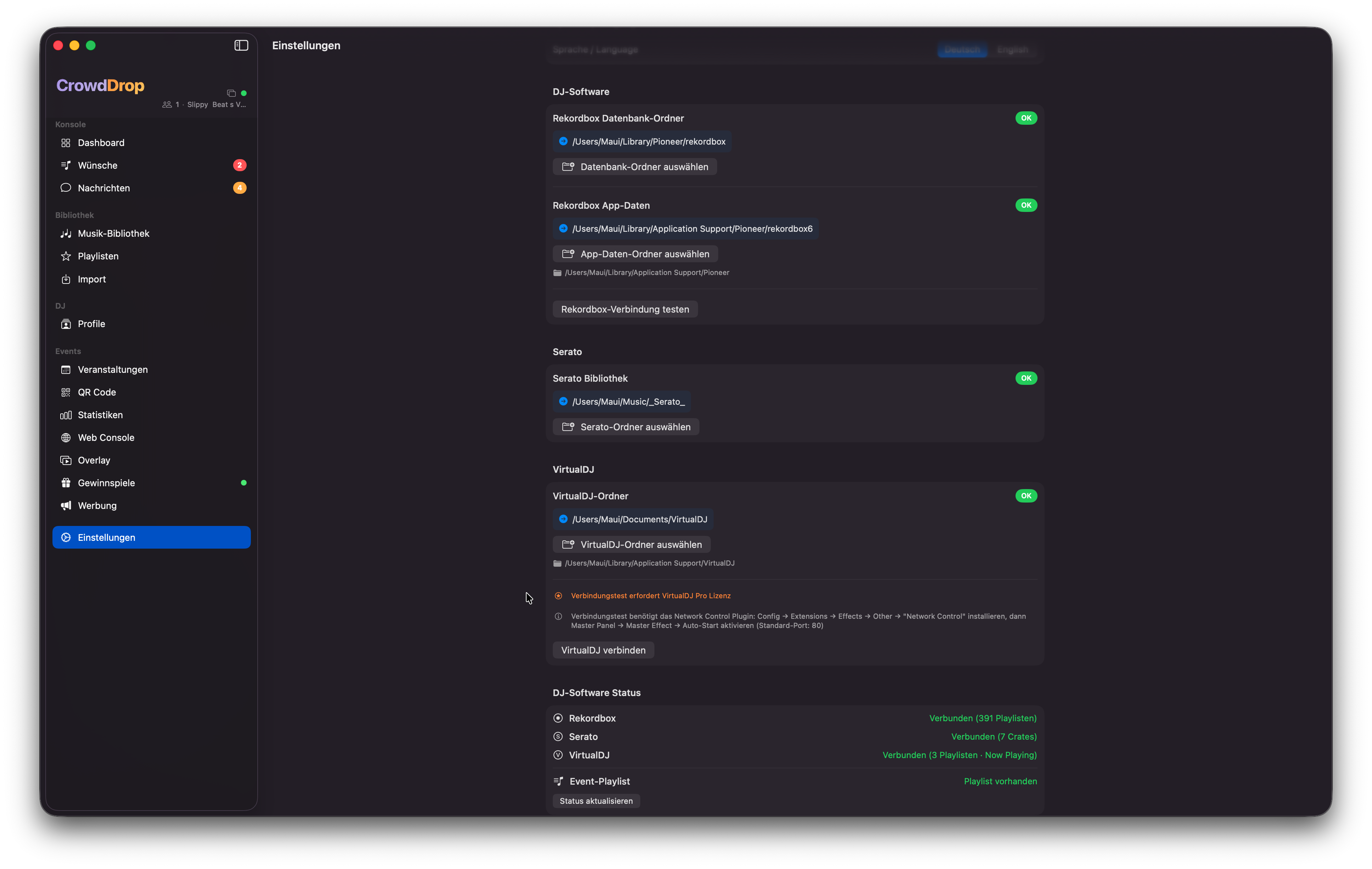
Einstellungen
Einstellungen: Erscheinungsbild, DJ-Software, Benachrichtigungen und AccountSettings: appearance, DJ software, notifications and account
Globale EinstellungenGlobal Settings
  • ErscheinungsbildAppearanceSystem / Hell / Dunkel — steuert das Farbschema der gesamten App.System / Light / Dark — controls the colour scheme of the entire app.
  • SpracheLanguageDeutsch oder English — wechselt alle UI-Texte sofort.German or English — switches all UI texts immediately.
  • DJ-SoftwareDJ softwareRekordbox-Datenbankpfad und Serato-Bibliotheksordner setzen (mit Auto-Erkennung).Set Rekordbox database path and Serato library folder (with auto-detection).
  • BenachrichtigungenNotificationsNeuer Wunsch, Neue Nachricht, Trinkgeld-Klick, Sound an/aus.New request, new message, tip click, sound on/off.
  • Now-Playing IntervallNow playing intervalWie oft die DJ-Software nach dem aktuellen Track gefragt wird (1–10 Sekunden).How often the DJ software is polled for the current track (1–10 seconds).
ℹ️Event-spezifische Einstellungen (Branding, Gästelimits, Trinkgeld) findest du unter Veranstaltungen → Event auswählen → Detail. DJ-Profile und Trinkgeld-Links werden unter DJ → Profile verwaltet.Event-specific settings (branding, guest limits, tipping) are found under Events → Select event → Detail. DJ profiles and tipping links are managed under DJ → Profiles.
📱
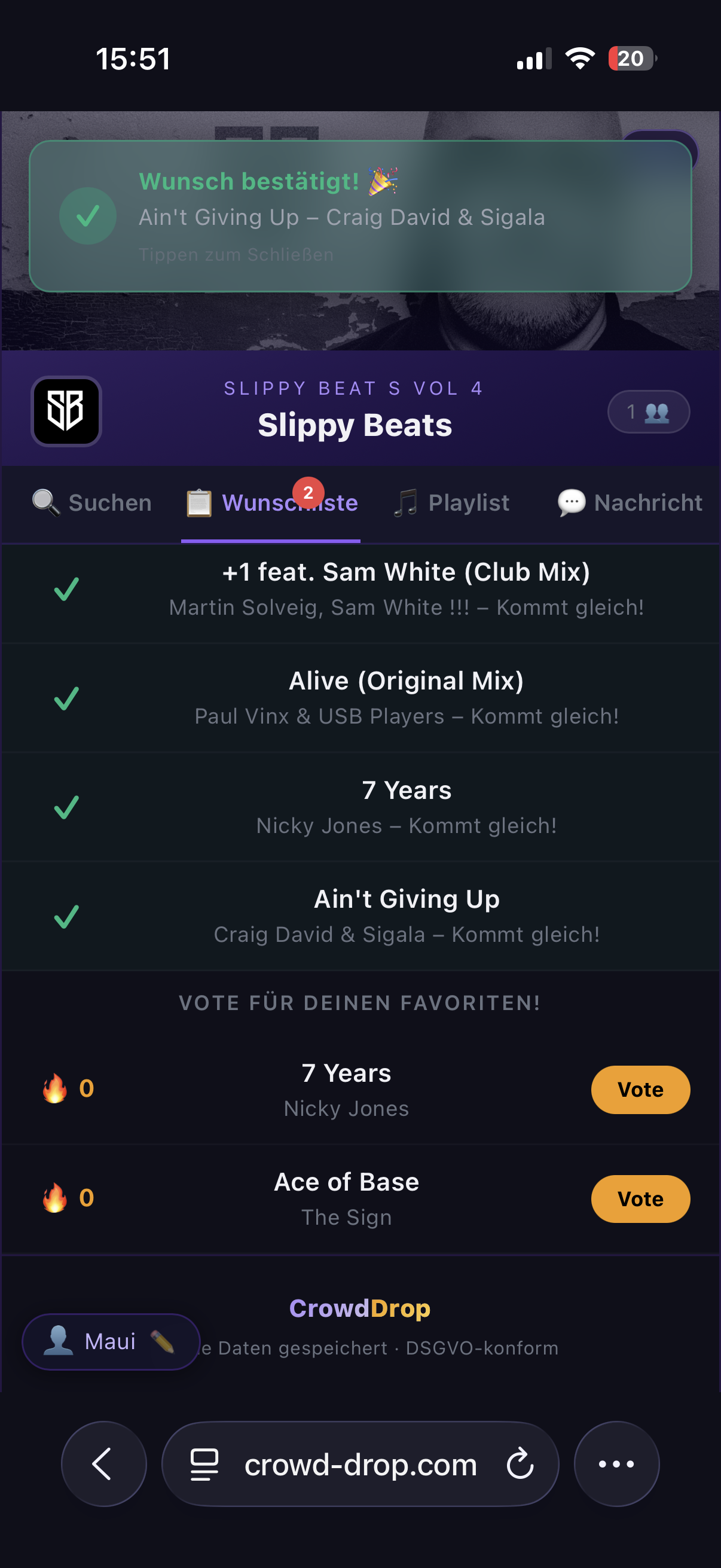
Gäste-App (PWA)Guest App (PWA)
Was deine Gäste auf dem Smartphone sehenWhat your guests see on their smartphone
Gäste-App
Gäste-App: Bestätigung eines Musikwunsches auf dem SmartphoneGuest app: confirmation of a song request on the smartphone
So treten Gäste beiHow guests join
Gäste scannen den QR-Code mit dem Smartphone-Kamerascan — der Browser öffnet sich direkt, keine App-Installation, keine Registrierung, kein Account nötig.Guests scan the QR code with the smartphone camera — the browser opens directly, no app installation, no registration, no account needed.
Was können Gäste tun?What can guests do?
  • Song wünschenRequest a songIn der Bibliothek nach Titel oder Künstler suchen und Wunsch absenden.Search the library by title or artist and submit a request.
  • AbstimmenVoteFür Songs anderer Gäste voten um sie nach oben zu bringen.Vote for other guests' songs to push them up.
  • Hotlist ansehenView hotlistDie DJ's Picks — kuratierte Vorschläge des DJs.The DJ's Picks — curated suggestions from the DJ.
  • Nachricht an den DJMessage the DJDirektnachricht senden — anonym oder mit eigenem Namen.Send a direct message — anonymous or with own name.
  • GewinnspieleContestsAn aktiven Gewinnspielen teilnehmen und QR-Code bei Gewinn erhalten.Participate in active contests and receive QR code if winning.
  • TrinkgeldTipDem DJ direkt über PayPal, Revolut, Cash App etc. ein Trinkgeld schicken.Send a tip directly to the DJ via PayPal, Revolut, Cash App etc.
Limits für GästeGuest Limits
Als DJ kannst du konfigurieren, wie viele Wünsche und Votes ein Gast pro Event abgeben darf (Standard: 3 Wünsche, 15 Votes). Diese Limits sind per Event einstellbar unter Veranstaltungen → Detail.As DJ you can configure how many requests and votes a guest can submit per event (default: 3 requests, 15 votes). These limits are configurable per event under Events → Detail.